The SVG dominant-baseline attribute changes the vertical reference point used to place text. SVG text normally uses a baseline at the bottom of the characters, so a text element positioned at y can sit above that coordinate or even outside the SVG at (0, 0). section 1.2.2 section 4.3.2
Figure 4.22 The y attribute of SVG text sets the vertical position of its baseline, which by default is positioned at the bottom of the text. We can change that with the dominant-baseline attribute. If we give this attribute the value "middle", the baseline of the text is shifted to its vertical middle, while the value "hanging" shifts the baseline to the top of the text.
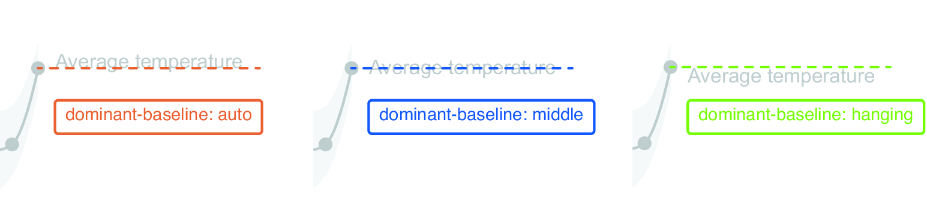
Use middle when the y coordinate should pass through the text’s vertical center; use hanging when it should mark the top of the text. section 4.3.2
This is especially useful for chart labels. Pair dominant-baseline="middle" with text-anchor="middle" to center a label on both axes of a known point, such as an arc centroid. For a label offset below a data point, a hanging baseline makes its y coordinate behave as the top edge, leaving the text below that point. section 4.4.3 section 4.3.2
Center a percentage label in an arc
Place the label at the centroid, then center it horizontally and vertically with matching middle values. innerChart.append("text") .text(d3.format(".0%")(percentageDaysWithPrecipitation / 100)) .attr("x", centroid[0]) .attr("y", centroid[1]) .attr("text-anchor", "middle") .attr("dominant-baseline", "middle"); section 4.4.3
Treat the attribute as a visual placement control rather than a substitute for coordinates: calculate the target point with scales or a centroid, then choose the baseline that makes the label relate clearly to that point. Small chart-label offsets can be tuned in the browser inspector until they look right. section 4.3.2 section 4.4.3
