The dot product combines two vectors and returns one scalar number. For vectors a = (a1, a2, a3) and b = (b1, b2, b3), it is a · b = a1b1 + a2b2 + a3b3. For example, (2, 3, 4) · (5, 6, 7) = 56. The same coordinate-by-coordinate rule works in 2D and generalizes to N dimensions. section 9.2.1
Its useful geometric meaning comes from projection and angle. When one vector has length 1, its dot product with another vector is the length of that other vector projected onto it. More generally, the result is the two vector lengths multiplied by the cosine of the angle between them. This turns a small arithmetic operation into a test of how strongly two directions align. section 9.2.1 section 9.2.4
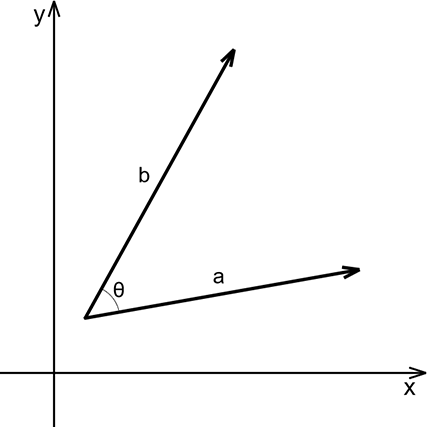
Use the projection diagram to connect the cosine term to the adjacent side of a right triangle: alignment preserves more of a vector’s length, while a right angle contributes none. section 9.2.1
Three directional cases make the sign easy to interpret:
- Co-oriented vectors produce the maximal lighting coefficient, 1, when both directions are normalized. section 9.2.3
- Orthogonal vectors have dot product 0, so one vector has no projection along the other. section 9.2.4
- Counter-oriented vectors produce -1 when normalized; lighting can ignore values below 0. section 9.2.3
Lighting a surface
For each visible surface element, form a normalized vector toward the light and take its dot product with the surface normal. The result is a lighting coefficient: facing the light is brightest, a perpendicular surface receives zero light, and a surface facing away can be darkened by clamping negative values. This same scene-lighting picture is a practical mnemonic for remembering that the formula uses cosine. section 9.2.3 section 9.2.4
The dot product also expresses geometric constraints. To join an arc smoothly to a line segment, the vector from the arc center to the intersection point must be orthogonal to the segment direction. Writing their dot product as zero supplies the smoothness equation alongside the equations for the arc center and line intersection. section 5.3.2
Listing 5.2 Solution to an arc and line segment equation
x1, y1, dx1, dy1 = symbols('x1 y1 dx1 dy1')
x2, y2, dx2, dy2 = symbols('x2 y2 dx2 dy2')
r1 = symbols('r1')                         #1

ix, iy = symbols('ix iy')                  #2

ax1, ay1, t2 = symbols('ax1 ay1 t2')       #3

solutions = solve(
   [
    x1 - r1*dy1 - ax1,                     #4
    y1 + r1*dx1 - ay1,
    x2 + dx2 * t2 - ix,                    #5
    y2 + dy2 * t2 - iy,
    (ix-ax1)*dx2 + (iy-ay1)*dy2            #6
], (ax1, ay1, t2, ix, iy))
The SymPy system includes the dot-product-equals-zero constraint with equations for the arc center and line point, solving five variables for a smooth arc-and-segment piece. section 5.3.2
In SymPy’s 3D vector system, vectors are weighted sums of basis vectors in a coordinate system. Call a.dot(b), or use a & b, to compute their dot product. A compact 2D helper can simply return x1*x2 + y1*y2; it is useful for projecting a point onto a segment, including the normalized projection that decides whether the closest point lies before, within, or after the segment. section 9.2.2 section 10.1.4











