dotnet publish prepares a .NET application for deployment by publishing a project with a target framework and configuration. In a GitHub Actions Android job, it replaces dotnet build and creates a signed AAB. section 12.2.2
A practical publishing workflow can:
- Specify the project path, Android target framework, and Release configuration. section 12.2.2
- Pass Android signing settings through to MSBuild with /p: arguments, including the keystore path, passwords, alias, and signing flag. section 12.2.2
- Upload the resulting signed AAB as a GitHub Actions artifact for a later deployment job. section 12.2.2
Publish and sign an Android app
dotnet publish src/Presentation/MauiStockTake.UI/MauiStockTake.UI.csproj -f:net7.0-android -c:Release /p:AndroidKeyStore=True /p:AndroidSigningKeyStore="${{ github.workspace }}/mauistocktake.keystore" /p:AndroidSigningKeyPass=${{ secrets.ANDROID_KEYPASSWORD }} /p:AndroidSigningKeyAlias=${{ secrets.ANDROID_KEYSTOREALIAS }} /p:AndroidSigningStorePass=${{ secrets.ANDROID_KEYSTOREPASSWORD }} section 12.2.2
Figure 12.10 The dotnet publish command is similar to the dotnet build command we saw in chapter 2. You provide the path to the project to be published, the target framework and configuration, and any additional MSBuild arguments.
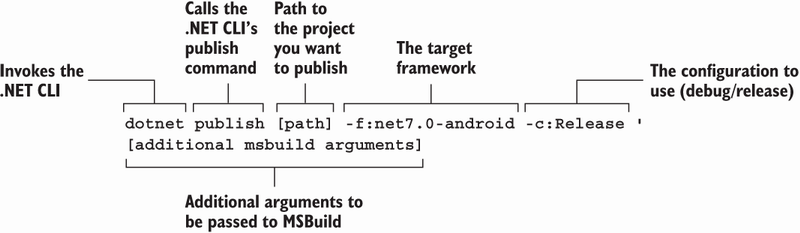
Command anatomy showing the project path, target framework, configuration, and additional MSBuild arguments. section 12.2.2

