Duplex is an Ethernet interface setting that determines whether the interface can send and receive data simultaneously. Half-duplex interfaces send or receive, but not both at once; full-duplex interfaces do both at the same time. section 8.1.3
Duplex behavior depends on the connected medium and device:
- Switched wired Ethernet normally operates in full-duplex mode, allowing simultaneous transmission and reception. section 8.1.3
- Wireless LANs and legacy hub-based Ethernet operate in half-duplex mode because devices share the transmission medium. section 8.1.3 section 8.4
- Autonegotiation lets connected interfaces advertise capabilities and select the best shared speed and duplex mode. section 8.2
- Leave autonegotiation enabled for end devices such as PCs; manual settings may be used on infrastructure links but introduce human-error risk. section 8.2
Cisco IOS configuration and verification
Configure a full-duplex link manually with `interface g0/1` followed by `duplex full`. Configure end-user ports to negotiate with `interface range f0/1-2` followed by `duplex auto`. Verify the result with `show interfaces status`; manually configured full duplex appears as `full`, while negotiated full duplex appears as `a-full`, where `a-` indicates autonegotiation. section 8.1 section 8.1.3
A duplex mismatch occurs when connected interfaces use different duplex settings or when only one side uses autonegotiation. Both interfaces can remain up/up, but performance falls sharply. The half-duplex side may show increasing collisions and late collisions, while the full-duplex side may show Runts or CRC errors. section 8.3.2
Figure 8.1 Interface configurations on R1 and SW1: (1) configuring R1’s G0/1 interface with an IP address, description, and manual speed and duplex settings; (2) configuring SW1’s G0/1 interface with a description, and manual speed and duplex settings; (3) configuring SW1’s connections to end-user devices (PCs) using autonegotiation; (4) disabling SW1’s unused interfaces.
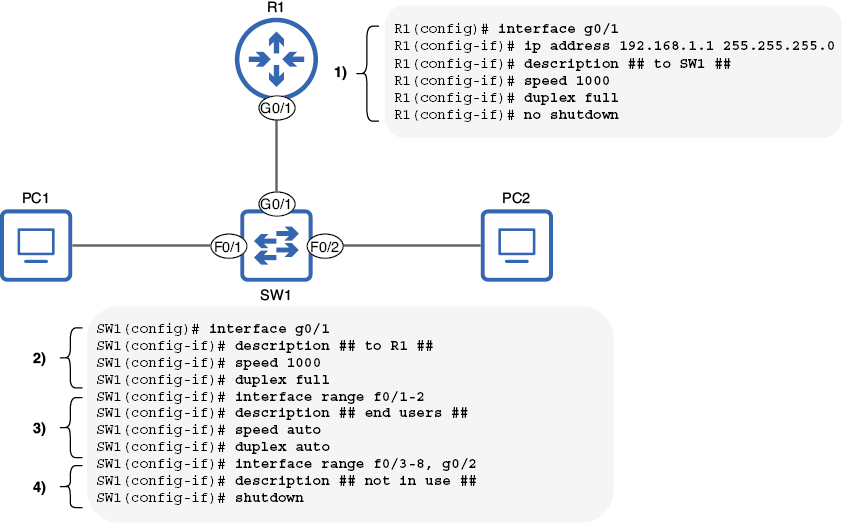
Compare router and switch interface configurations, including manually configured duplex, autonegotiated end-user ports, and disabled unused interfaces. section 8.1
