Dynamic content lets one workflow step use data produced by an earlier step. In Logic Apps, these fields act as parameters, inputs, and outputs that connect the workflow’s data flow. section 8.3.3
Use dynamic content to map values between connected operations:
- Choose an earlier step’s output when filling a later action’s field, such as using file content as tweet media. section 8.3.3
- Map email attachment properties into Blob Storage fields, including the blob name, content, and content type. section 2.2.12
- Expect Logic Apps to create a For Each operation when the selected dynamic content is a collection, such as multiple attachments. section 2.2.12
From uploaded image to tweet
A Blob Storage upload triggers a Logic App. The tweet action receives the image’s File Content through a dynamic field, while the tweet text is supplied separately. Saving and triggering the workflow tests the complete data flow. section 8.3.3
From email attachment to blob
A workflow filters emails for attachments, then maps each attachment’s name, content, and content type into a new blob. The workflow can store multiple attachments without custom code. section 2.2.12
Figure 8.20 The content dialog used to add values from the previous step is the power of Logic Apps.
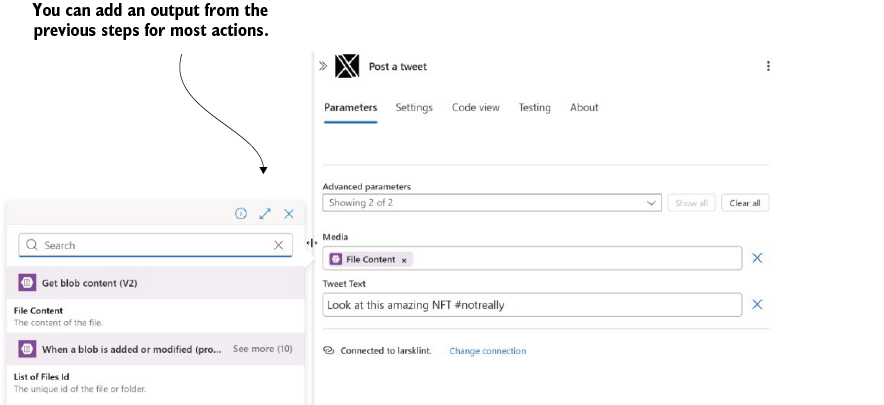
Inspect the content dialog that supplies values from an earlier Logic App step to a later action. section 8.3.3
