DynamicResource is a .NET MAUI XAML markup extension for values that may change while an app runs. It resolves a resource by key and keeps the consuming UI updated when the source resource changes. Use it when a user can switch a color palette without reopening a page or recreating its views. section 10.1.2
It differs from StaticResource in one important way: StaticResource treats its resolved value as fixed at run time, whereas DynamicResource lets a later resource change flow through to the UI. A style that uses DynamicResource for its colors can therefore remain in place while the palette behind those keys is replaced. section 10.1.2
Swapping a color palette
Define two palettes with matching resource keys, then apply styles whose color values use DynamicResource. When the active palette is swapped, views using those styles automatically redraw with the replacement colors. This suits app-controlled, user-selectable color schemes. section 10.1.2
Figure 10.10 This app contains two color palettes and one set of styles. The styles use DynamicResource, so the color palette can be swapped out at run time, and views that apply the style will automatically update in real time.
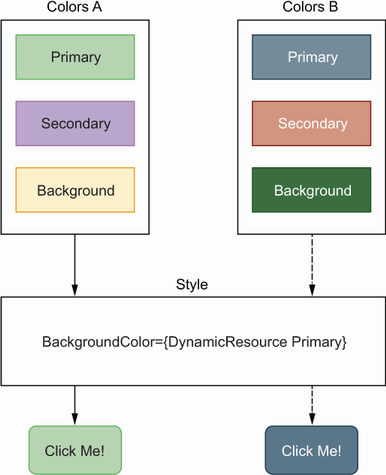
This diagram shows the key arrangement: two palettes feed one set of styles, and DynamicResource causes styled views to update when the palette changes. section 10.1.2
Do not combine DynamicResource with AppThemeBinding: they do not work together. If an app needs both a selectable theme and responses to operating-system light and dark mode, swap an entire resource-dictionary theme containing colors and styles instead; its styles can use StaticResource and AppThemeBinding. section 10.1.2
Choose the resource approach by the behavior required:
- Use DynamicResource to replace colors at run time and update existing consumers automatically. section 10.1.2
- Use AppThemeBinding for views tied to the device light or dark mode setting. section 10.1.2
- Use a replaceable theme resource dictionary when user-selectable themes must also support light and dark mode. section 10.1.2
