Amazon Elastic Container Service (ECS) is a managed AWS service for deploying and running containerized applications. It orchestrates containers through clusters, task definitions, tasks, and services. section 18.0 section 18.6
Build an ECS deployment from four cooperating components:
- Cluster: a logical group that isolates workloads, such as test and production environments. section 18.3
- Task definition: the container image, CPU and memory limits, environment variables, and network configuration; it can describe one or multiple containers. section 18.3
- Task: a running instance created from a task definition, with all its containers sharing the same host. section 18.3
- Service: maintains multiple tasks, replaces failed tasks, spreads them across availability zones, scales capacity, and orchestrates rolling updates. section 18.3
Fargate supplies managed compute capacity, so container deployments do not require maintaining EC2 instances. A typical web architecture places an Application Load Balancer before an ECS service, while S3 stores application data. ECS integrates broadly with AWS and supports CloudFormation, but App Runner offers greater simplicity and fewer capabilities. section 18.5 section 18.6
Deploying a web application
A Notea deployment uses CloudFormation to create an ECS cluster, task definition, Fargate-backed service, load balancer, and S3 storage. The service starts two tasks, connects the application to the load balancer, and can scale the desired task count from two to four according to CPU utilization. Create the stack with the AWS CLI, wait for completion, then retrieve its output URL. section 18.5
Figure 18.3 A task definition defines all the details needed to create a task, which consists of one or multiple containers.
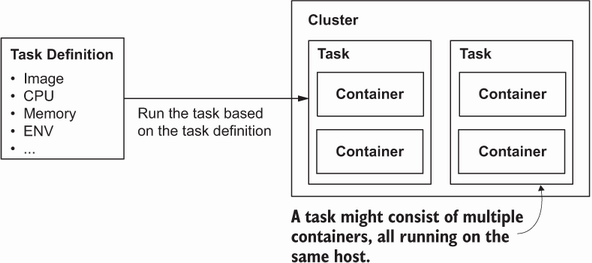
Use the task-definition diagram to inspect how container configuration becomes a running ECS task. section 18.3
