liveBook · Manning

Edge link

As explained in Acing the CCNA Exam: Volume 1 Fundamentals and Protocols

An RSTP edge link is a link connecting a switch port to an end host, allowing the port to transition immediately to forwarding without posing a Layer 2 loop risk.

An RSTP edge link connects a switch port to an end host. Because the connection is not expected to create a Layer 2 loop, the port can transition immediately to forwarding without the RSTP synchronization process. section 15.3

Configure an edge link on Cisco switches by enabling PortFast on the interface:

  • Use spanning-tree portfast in interface configuration mode. section 15.5
  • Recognize an edge link as a point-to-point link connected to an end host; it does not use the RSTP sync mechanism. section 15.5
Figure 15.7 RSTP differentiates between three link types: point-to-point, shared, and edge. A full-duplex link is considered a point-to-point link. A half-duplex link is considered a shared link. A link between a switch and an end host that uses PortFast is considered an edge link.
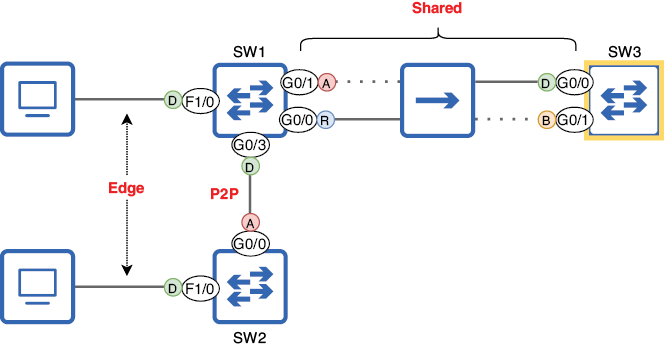
Compare edge, point-to-point, and shared links in the topology figure. section 15.3

How Acing the CCNA Exam: Volume 1 Fundamentals and Protocols covers it

How deep it goes
Defines the link type, explains its forwarding behavior, and gives the Cisco configuration command.
Examples
Shows switch-to-end-host ports and identifies a P2p Edge interface in spanning-tree output.
What it assumes
Assumes familiarity with switch ports and RSTP link types; distinguishes edge links from full- and half-duplex connections.
What you can do after
Apply PortFast to configure an end-host connection as an edge link.
How it connects
Connects RSTP with PortFast, point-to-point links, shared links, and Layer 2 loop prevention.

Related concepts

This explainer was generated by Manning's knowledge graph from the text of Acing the CCNA Exam: Volume 1 Fundamentals and Protocols. The section links point to the parts of the book it draws on.