Amazon Elastic File System (EFS) is a network filesystem that multiple Linux EC2 instances can mount and use at the same time. It speaks NFSv4.1 and grows as files are added, so you do not provision storage capacity up front. EFS replicates data across availability zones within an AWS region. section 9.0 section 9.1
A load-balanced WordPress site shows why shared files matter: either web server may handle a request, but both need access to application files and user uploads. EFS supplies that shared filesystem; RDS stores the MySQL database. Unlike EFS, an EBS volume is tied to one availability zone and normally attached to one EC2 instance. section 2.1 section 2.2.4 section 9.0
To share files across EC2 instances:
- Create an EFS filesystem and mount targets. Use mount targets in two availability zones for fault tolerance; protect them with security groups. section 9.1 section 9.7
- On each Linux instance, install the EFS mount helper and mount the filesystem at a local directory. The filesystem’s DNS name resolves to the mount target for the instance’s subnet. section 9.3
- Use the mount options tls for encrypted transport and iam for authentication through the instance’s IAM role. Configure /etc/fstab if the filesystem should mount on startup. section 9.3
Mount a shared home directory
On Amazon Linux 2, run `sudo yum install amazon-efs-utils`, then `sudo mount -t efs -o tls,iam fs-123456 /home`, replacing the example filesystem ID. Before mounting an initially empty filesystem over an existing `/home`, copy any files that must remain available. Mount it on a second instance and create a file on one machine; seeing that file on the other confirms they share the directory. section 9.3 section 9.4
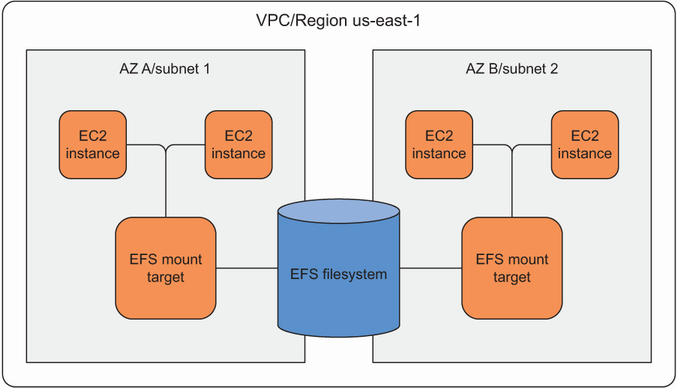
Mount targets are the subnet endpoints through which EC2 instances reach the shared filesystem. section 9.0
Plan for workload and operating costs. Bursting throughput suits short periods of heavier I/O; provisioned throughput is an option for consistently high demand and incurs an additional charge. General Purpose and Max I/O performance modes serve different file-access patterns. Monitor throughput and burst credits, and use AWS Backup to create and restore filesystem snapshots. EFS is not supported by Windows EC2 instances in this setup. section 9.5.2 section 9.7 section 9.0

