An Elasticsearch index is a logical collection of JSON documents: a named bucket such as books, cars, news, or trades. It resembles a relational database table as a place to group records, but it can be created without defining a schema first. An index is logical rather than a single physical storage location; shards store and retrieve its data. section 3.1.2 section 3.2.2
For a bookstore search application, put related book documents in one books index. Indexing means persisting documents into that bucket. A document request names the index, the _doc endpoint, and a document ID; Elasticsearch accepts the document body as JSON. section 2.1.2 section 5.1
Add a book to an index
Send PUT books/_doc/1 with fields such as title, author, release_date, rating, bestseller status, and prices. If successful, Elasticsearch returns JSON metadata including the index, ID, document version, result, and HTTP status. Add further documents to the same books index before retrieving or searching them. section 2.1.2 section 2.1.3 section 2.1.4
Listing 2.1 Indexing a book document into the books index
PUT books/_doc/1                     #1
{                                    #2
  "title":"Effective Java",          #2
  "author":"Joshua Bloch",           #2
  "release_date":"2001-06-01",       #2
  "amazon_rating":4.7,               #2
  "best_seller":true,                #2
  "prices": {                        #2
    "usd":9.95,                      #2
    "gbp":7.95,                      #2
    "eur":8.95                       #2
  }                                  #2
}
Use the request as a focused template: the path selects the books index and document ID, while the JSON body supplies searchable book data. section 2.1.2
An index is backed by shards, which are Apache Lucene instances. Primary shards hold documents; replica shards copy primaries. Shards can place an index across nodes, while replicas improve redundancy and can speed search queries. Version 7.x defaults a newly created index to one shard and one replica; replica counts can change, but shard counts cannot change on a live index. section 3.2.2
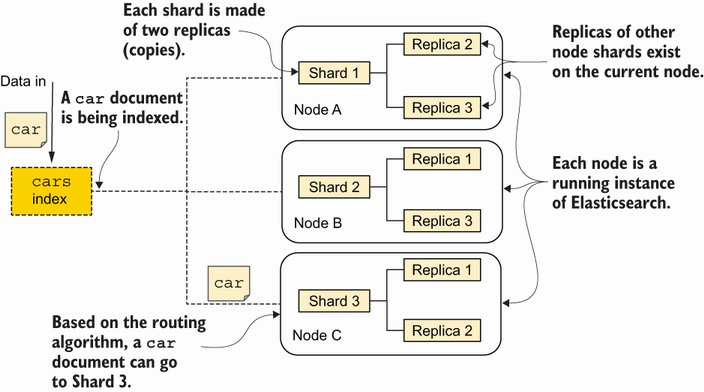
The diagram makes the index’s logical design concrete by showing three shards and two replicas per shard across nodes. section 3.2.2
An index can appear implicitly when the first document is indexed, using default settings and dynamic mapping. This is convenient for exploration, but explicit creation gives production control over mappings, shard allocation, replicas, and aliases. Dynamic mapping can misclassify non-ISO dates as text, so define important fields deliberately. section 6.2 section 6.2.2
Create an index with mappings
Create cars_with_mappings with PUT and a mappings.properties object. Define make and model as text, and define registration_year as a date with format dd-MM-yyyy. Settings and mappings can be combined when an index needs both a schema and a chosen replica count. section 6.2.4
Plan changes before an index is live. Existing field types cannot be modified because stored data was indexed using the original schema. To correct a field definition, create a new index, reindex data from the old one, switch the application when ready, and remove the old index after validation. Aliases can support a seamless switch. section 4.3.3
As data grows, index management also includes settings, mappings, aliases, templates, monitoring, and lifecycle policies. Sound index configuration supports efficient storage and retrieval, resiliency, scaling, high availability, and future operations. section 6.0 section 6.1

