Maps arbitrary data to a point on an elliptic curve by treating the data as a candidate x-coordinate, then adjusting x until f(x) has a modular square root. For a curve y² = x³ + a₄x + a₆, compute f(x), test whether it is a quadratic residue, and increment x modulo the field prime when it is not. section 3.1.5 section 3.3
The implementation follows this loop:
- Copy the input value into the point's x-coordinate and compute f(x) modulo the field prime. section 3.3
- Test whether f(x) has a square root; a nonzero quadratic-residue result indicates that x lies on the curve. section 3.1.5 section 3.3
- Increment x by one and repeat the test until a usable coordinate is found. section 3.3
- Compute both square roots for y, returning the two corresponding points and choosing their ordering by numeric value. section 3.3
Toy-curve search
For y² = x³ + 23x − 1 mod 43, try x = 27: f(x) = 7, which fails the Legendre-symbol test. Values 28 and 29 also fail. At x = 30, the test succeeds and y = 4 or −4, producing two curve points. section 3.1.5
Figure 3.7 Embedding data on a curve
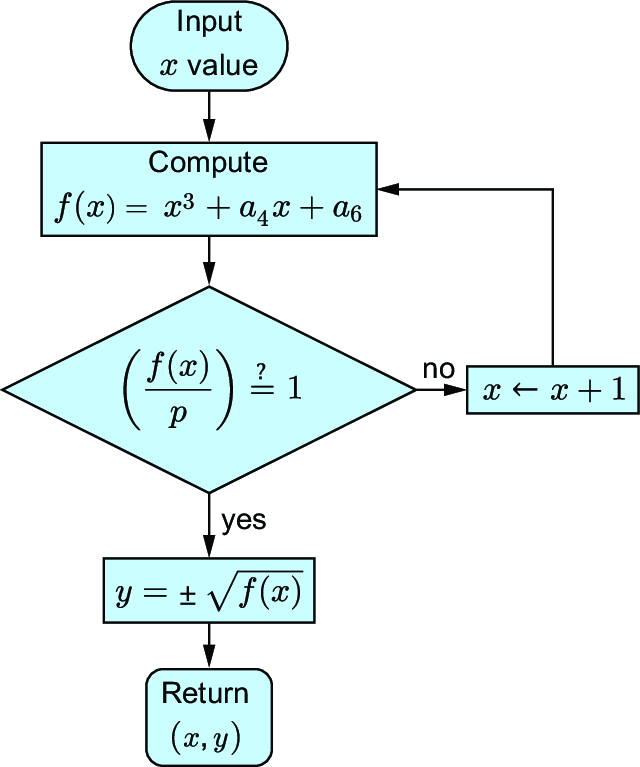
Use the embedding flow diagram to visualize candidate evaluation, repeated x-incrementing, and final point construction. section 3.1.5
Listing 3.9 Embedding data: Finding points
void elptic_embed(POINT *P1, POINT *P2, mpz_t x, CURVE E)
{
  mpz_t f, one;
  int done;

  mpz_init(f);
  mpz_init_set_ui(one, 1);  #1
  mpz_set(P1->x, x);
  done = 0;
  while(!done)
  {
    fofx(f, P1->x, E);   #2
    if(msqr(f) > 0)   #2
      done = 1;   #2
    else
      madd(P1->x, P1->x, one);  #3
  }
  mpz_set(P2->x, P1->x);
  msqrt(P1->y, f);   #4
  mneg(P2->y, P1->y);   #4
  done = mpz_cmp(P2->y, P1->y);   #5
  if(done < 0)   #5
    mpz_swap(P2->y, P1->y);   #5
  mpz_clears(f, one, NULL);
}
Use the point-finding routine to inspect initialization, the residue-testing loop, square-root calculation, negation, and root ordering. section 3.3