Enable-PSRemoting configures a computer to receive PowerShell remoting connections. Run it from an elevated PowerShell session when preparing a computer for remote administration. section 13.4
The cmdlet prepares several parts of the remoting system:
- Starts the WinRM service and configures it to start automatically. section 13.4
- Registers PowerShell as an endpoint and creates a default WinRM listener on all local IP addresses. section 13.4
- Creates a Windows Firewall exception for incoming WinRM traffic. section 13.4
Enable remoting
Open PowerShell as Administrator and run: Enable-PSRemoting. If a network connection is marked Public, the firewall exception may fail; change the connection type before retrying. section 13.4
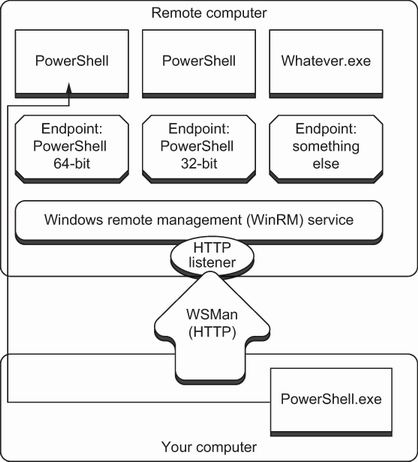
Trace how WinRM and WSMan connect listeners to PowerShell endpoints. section 13.4
