Encapsulation dot1q is a Cisco IOS subinterface command that associates an IEEE 802.1Q VLAN with a router subinterface. In router-on-a-stick, tagged frames for that VLAN enter through the physical trunk and are handled by the matching subinterface. section 12.4.1
Configure the association from subinterface configuration mode:
- Enter a subinterface, such as interface g0/0.10. section 12.4.1
- Apply encapsulation dot1q 10 to associate the subinterface with VLAN 10. section 12.4.1
- Add an IP address to the subinterface; repeat for each routed VLAN. section 12.4.1
- Optionally append native to identify the native VLAN, as in encapsulation dot1q 10 native. section 12.4.1
VLAN 10 subinterface
R1(config)# interface g0/0.10 R1(config-subif)# encapsulation dot1q 10 R1(config-subif)# ip address 172.16.1.1 255.255.255.192 The .10 identifier helps readability but does not determine the VLAN; the encapsulation command does. The physical interface must be enabled with no shutdown. section 12.4.1
Figure 12.10 PC3 (in VLAN 20) sends a packet to PC10 (in VLAN 10), and the packet is routed using the router on a stick method. R1’s G0/0 interface has three subinterfaces: G0/0.10 (VLAN 10, 172.16.1.1), G0/0.20 (VLAN 20, 172.16.1.65), and G0/0.30 (VLAN 30, 172.16.1.129). PC3’s frame to R1 is tagged in VLAN 20 over the trunk link from SW1 G0/1 and R1 G0/0. R1’s frame to PC10 is tagged in VLAN 10 over the trunk link from R1 G0/0 to SW1 G0/1, and the trunk link from SW1 G0/0 to SW2 G0/0.
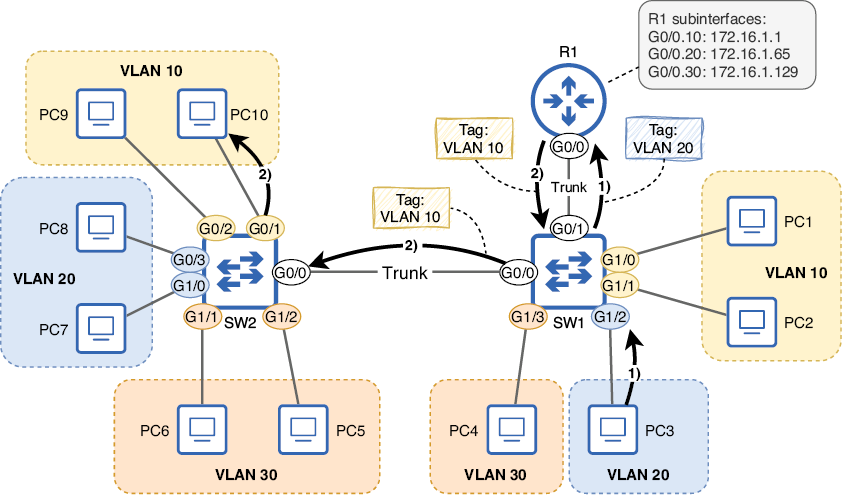
Trace tagged traffic between VLAN 20 and VLAN 10 across router subinterfaces and trunk links. section 12.4.1
