Entity mapping connects query results to Microsoft Sentinel entities, making accounts, hosts, and other recognized objects available during incident investigation. section 8.4.4
Configure mappings in a scheduled rule:
- Choose Account as the entity type, select Name as the identifier, and map it to the query’s Account field. section 8.4.4
- Add Host, select HostName, and map it to the Computer field so investigations connect the user with the endpoint. section 8.4.4
- Map up to five recognized Sentinel entities; leave Custom Details and Alert Details blank when they are unnecessary. section 8.4.4
Failed-login detection
A query summarizes failed logins by Account and Computer. Mapping those fields to Account/Name and Host/HostName identifies both the involved user and endpoint in resulting incidents. section 8.4.4
Figure 8.5 Test with current data runs a simulation of the query you’re writing on top of your own data
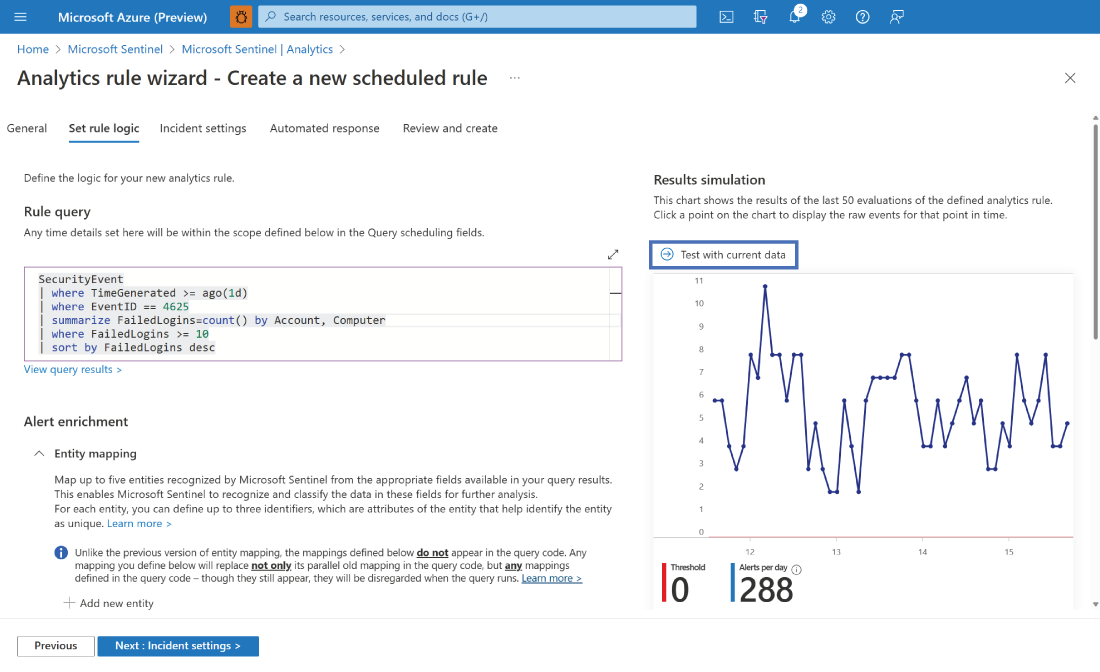
Preview the rule with current environment data before relying on its entity mappings. section 8.4.4
