An environment pipeline deploys and maintains the services running in an environment. A service pipeline builds, tests, packages, and publishes a release; the environment pipeline takes that release into staging, QA, or production. Keeping these jobs separate gives teams control over when a version reaches customers. section 3.1 section 4.1
Each environment has a configuration that names the services and versions it should run. To promote a release, update that environment’s configuration rather than rebuilding the service. A Git repository can serve as the source of truth; configuration changes may be automated, while a sensitive environment may require stakeholder approval. section 4.1 section 4.3
A typical pipeline follows this loop:
- Detect a configuration change by polling the repository or receiving a webhook, then fetch the desired configuration. section 4.1.3
- Apply the desired state to the target Kubernetes cluster, using credentials scoped to the pipeline. Possible commands include `kubectl apply -f` and `helm install`. section 4.1.3
- Verify that the live state matches the repository, and address configuration drift. With GitOps, an agent continues checking and reconciling the two. section 4.1.3 section 4.1.2
The repository layout and deployment tool are choices, not the definition of the pipeline. Plain Kubernetes YAML is simple but can duplicate service definitions across environments. A parent Helm chart can collect service dependencies; helmfile can declare separate Helm releases. Argo CD packages the GitOps workflow: it monitors configuration in Git, applies it to clusters, and reports when an environment is out of sync. section 4.1.4 section 4.2
Promoting a service release
A merge to a service’s main branch triggers a service pipeline that publishes a new release and its deployment artifacts. An automated pull request then updates a low-risk environment’s repository to select the new version. After that version is tested in staging, a separate pull request can update production’s configuration, with additional checks before it is merged. The environment pipelines deploy the versions specified by their respective repositories. section 4.3 section 4.1
Figure 4.5 Defining the state of the cluster using the configuration in Git (GitOps). Environment pipelines monitor configuration changes on a Git repository and apply those changes to the infrastructure (Kubernetes cluster) whenever a new change is detected. Following this approach allows us to roll back changes in the infrastructure by reverting commits on Git. We can also replicate the exact environment configuration by just running the same pipeline against another cluster.
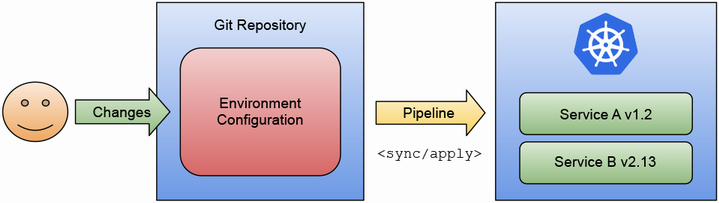
The diagram traces configuration changes from Git to a Kubernetes cluster. It also shows why reverting a commit can roll back a change and why the same configuration can be applied to another cluster. section 4.1.2
Infrastructure as Code can provision the cluster and other cloud resources; the environment pipeline then synchronizes the environment’s application configuration. A platform can create repositories and manage access so development teams can promote releases without maintaining every deployment tool themselves. Direct cluster access may still be appropriate for some development environments. section 4.1.2 section 4.4
