When several services and their APIs must move through Dev, QA, Staging, and Production, deployment configuration needs a reviewed source of truth. A configuration repository—also called an environment repository—holds the desired application, infrastructure, and API gateway configuration for each environment in version control. Teams change that state through Git rather than editing the gateway through its UI or accessing the runtime environment directly. section 9.4.2 section 9.4.1
A typical update follows this path:
- A change to an application repository triggers CI. Templates in that repository generate configuration or deployment manifests; for Kubernetes, an update might change the container version in a manifest. section 9.4.2
- CI raises an automated PR against the configuration repository. Validation runs, and the platform team can review the proposed state before it is merged. section 9.4.1 section 9.4.2
- Merging to the main branch can start deployment. In a reconciliation-based setup, software agents compare the repository’s desired state with the deployed state and apply changes when they differ. section 9.4.2 section 1.5.6
Promoting an API configuration
Suppose an API update is ready to move from QA to Staging. One approach keeps a folder for each environment in a shared repository: promote the configuration by copying it from the QA folder to the Staging folder, then review and merge the change. Separate branches are possible but make changes across environments harder to track. Some teams use separate repositories instead of one shared repository to reduce competing automated PRs. section 9.4.2
The commit history records who changed the desired configuration and how it evolved; it also provides an audit trail for the environment. To roll back a merged change, use `git revert` and let the deployment process apply the resulting state. Direct edits through the gateway UI undermine this workflow: an agent can detect the drift and restore the repository’s desired configuration. section 9.4.1 section 1.5.6
Plan repository boundaries and secret handling deliberately. Frequent automated PRs from multiple CI processes can conflict when a pipeline works from an outdated clone; retrying the PR or splitting repositories can reduce contention. More repositories also mean more permissions and agent connections to manage. Do not put private keys, passwords, or certificates in Git: its persistent history and distributed clones expose them to repository users. GitOps itself does not prescribe a central secrets solution. section 9.4.3
Figure 9.8 Managing multiple applications and environments using a pull-based GitOps model depicting the configuration for the different environments in one central configuration repository
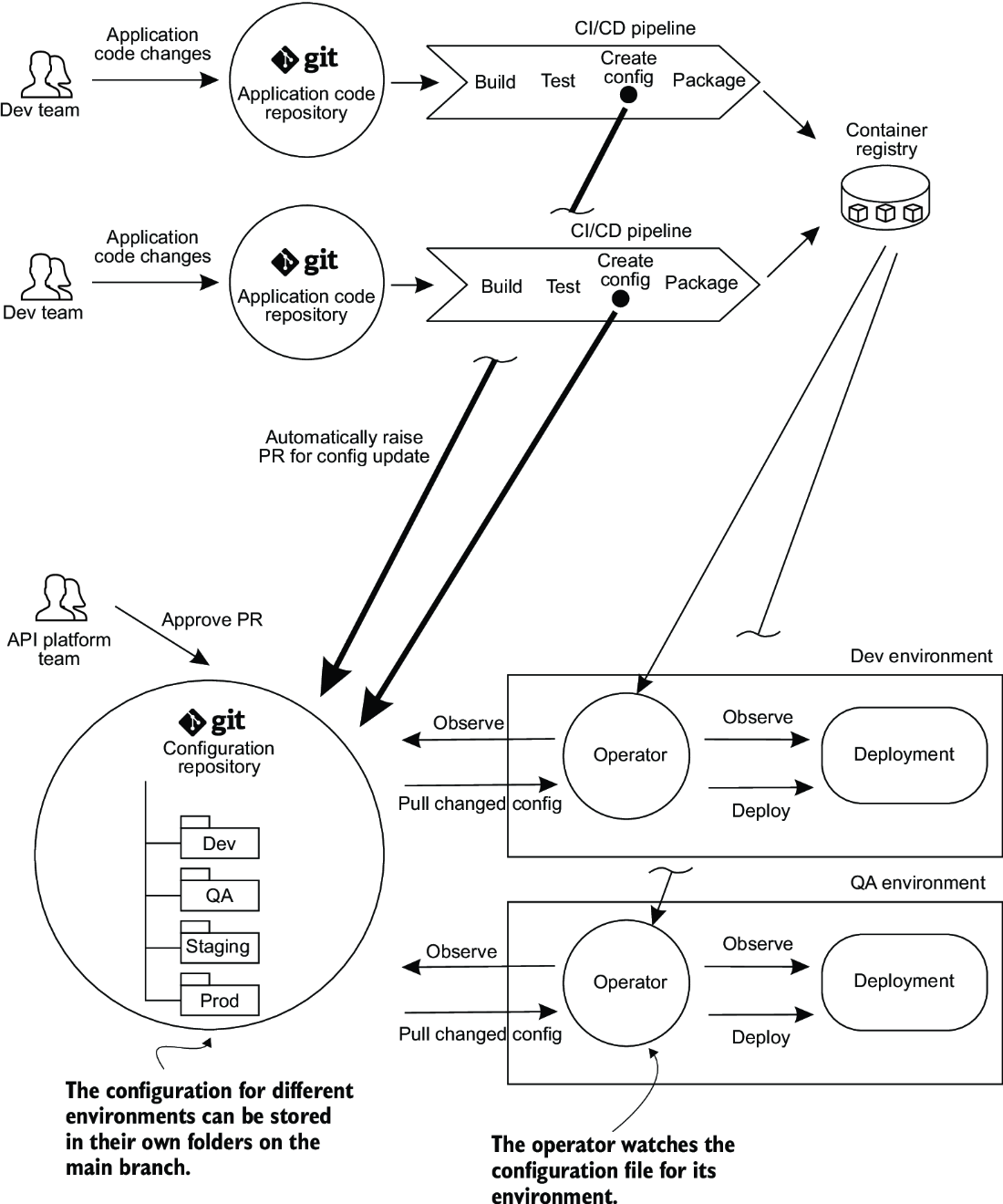
See how one central configuration repository arranges configurations for multiple applications and environments in a pull-based GitOps model. section 9.4.2

