liveBook · Manning

EnvironmentTagHelper

As explained in ASP.NET Core in Action, 3e

EnvironmentTagHelper is a built-in ASP.NET Core Tag Helper that conditionally renders its element content for specified hosting environments.

EnvironmentTagHelper conditionally renders an element and its content for selected hosting environments. It keeps environment-specific markup declarative and easier to read than embedding C# conditionals in Razor markup. section 18.5 section 18.6

Unlike Tag Helpers that add attributes to existing elements, this helper owns the entire element. The include attribute lists the environments in which the enclosed markup should appear. section 18.5

Show a warning outside production

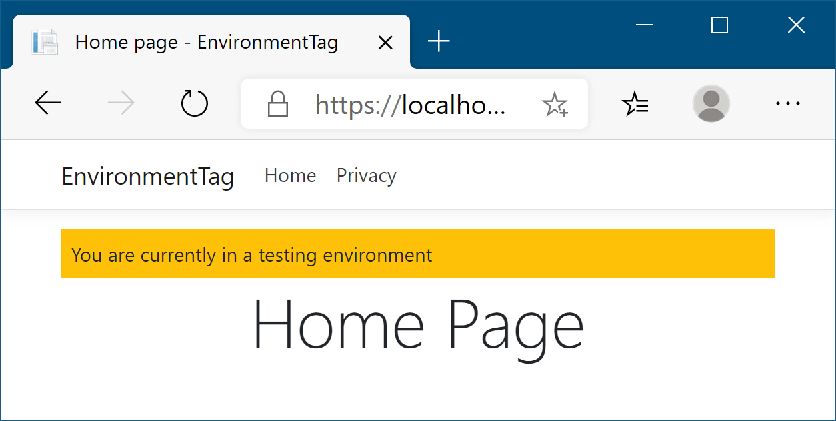
<environment include="Testing,Staging"> <div class="warning">You are currently on a testing environment</div> </environment> The warning appears in Testing and Staging environments, making it easier to distinguish those deployments from production. section 18.5

Figure 18.11 The warning banner will be shown whenever you’re running in a testing environment, to make it easy to distinguish from production.
CH18_F11_Lock3

Use the environment banner as a visible deployment signal while developing and testing the application. section 18.5

How ASP.NET Core in Action, 3e covers it

How deep it goes
Defines whole-element behavior, include configuration, and a Testing/Staging banner, but does not explore custom helper implementation.
Examples
Shows a warning banner rendered for Testing and Staging environments.
What it assumes
Assumes familiarity with Razor markup and hosting-environment values, while contrasting them with a C# if statement.
What you can do after
Apply it to keep environment-specific Razor markup declarative and readable.
How it connects
Connects Razor markup, Tag Helpers, C# conditional statements, and hosting environments.

Related concepts

This explainer was generated by Manning's knowledge graph from the text of ASP.NET Core in Action, 3e. The section links point to the parts of the book it draws on.