A sketch is an informal diagram—not a formal UML drawing—that makes a system’s main responsibilities and relationships visible. Its job is to establish clear boundaries: the UI handles display and clicks, logic coordinates behavior, and data stores information. Keeping those concerns apart prevents display, business, and database code from becoming tangled. section 1.5.4
Use a few boxes and arrows to make the boundary concrete before writing code:
- For a favorite-article feature, draw UI, Logic, and Data. The UI handles the click and favorite state; Logic checks login and coordinates the update; Data links a userID with an articleID. section 1.5.4
- For a leaky dependency, draw the class as a hexagon, show the arrow to the external service, add a port at the boundary, and redirect the arrow through it to an adapter outside. section 5.9.2
Refactoring an order processor
A sketch can split a monolithic order processor into Validator, Payment, Inventory, and Notifier boxes, coordinated by OrderService. The picture clarifies the desired structure before comparing a full refactor with smaller changes or doing nothing. section 3.5.2
Figure 1.5 Sketching things out on a whiteboard or piece of paper helps you visualize things more clearly.
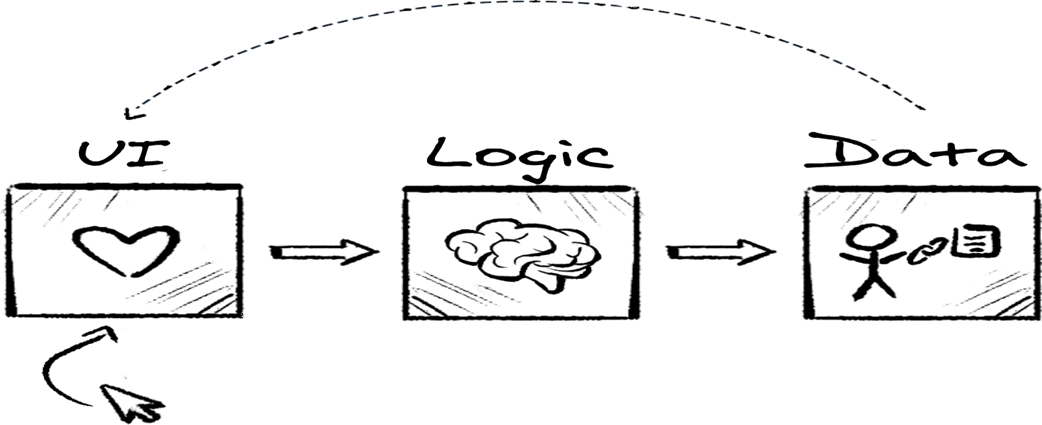
A whiteboard or paper sketch makes the proposed structure easier to visualize. section 1.5.4
