An ETL window is the scheduled period allowed for an extract, transform, and load process to run. It is an operational boundary, not merely a start time: a load that runs beyond its window can interfere with maintenance work, including backups. Plan it alongside recovery requirements rather than treating backup scheduling as an afterthought. section 12.0 section 6.2
Mistake #82: taking a backup in the middle of a non-rerunnable load. This can seem reasonable when backup schedules and ETL schedules are maintained separately. The risk is greatest when an ETL process spans many transactions, inserts rows into several tables, and generates rows with IDENTITY values: a failure can leave the database transactionally consistent while the business state of the overall load is incomplete. section 12.5
Overlapping schedule
Consider an ETL process scheduled at 1 a.m. that runs for five hours, while a full backup starts at 2 a.m. The schedules overlap for most of the load. Before accepting that overlap, determine whether the load can be rerun safely and whether its source data remains available in original form. section 12.5
Rerunnability is the safer property. A rerunnable process supports eventual convergence: after a partial failure, it can run again without duplicating data. That depends on retaining or otherwise retrieving the original source data, parameterizing dates instead of hardcoding GETDATE(), and merging data into target tables rather than relying on INSERT statements across a complex multi-transaction load. section 12.5
Use this planning checklist before scheduling backups against an ETL workload:
- Map the actual ETL duration and identify every backup that overlaps the window. section 12.5
- Verify that a failed load can be rerun without code changes, using parameterized dates and available source data. section 12.5
- Check whether target loading merges existing business data rather than creating duplicate business keys through repeated inserts. section 12.5
- Measure and optimize load performance when it threatens to overshoot the allotted window or disrupt maintenance processes. section 6.2
- Align the resulting schedule with recovery point objective and recovery time objective requirements. section 12.0
Figure 12.4 Backup during ETL
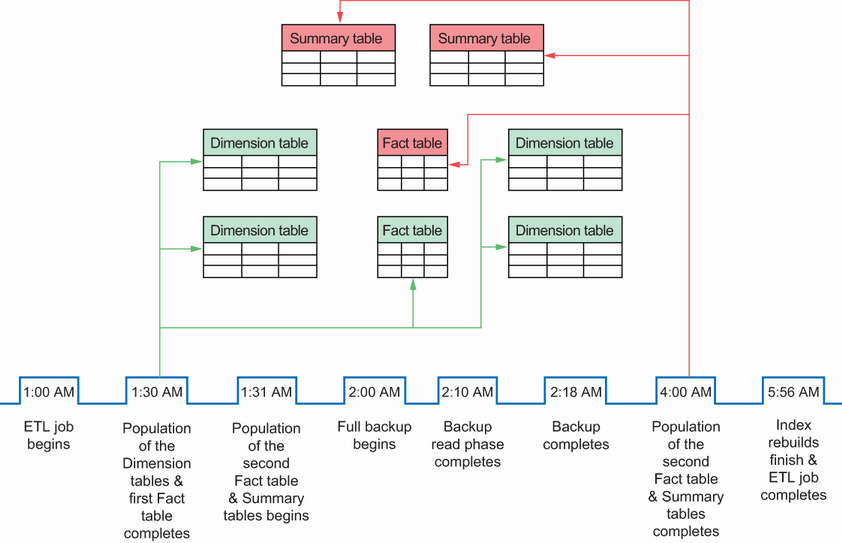
Use the schedule illustration to spot the period in which a full backup and a long-running ETL process overlap. section 12.5
