Event handling is the phase when a browser waits for events and invokes the handlers registered for them. It follows page building, where JavaScript can register handlers with addEventListener. section 2.1 section 2.4
Events take turns:
- The browser places detected events in a queue in the order they occur. section 2.3.1
- The event loop checks the queue and runs the handler for its next event, if one exists. section 2.3.1
- Only one handler runs at a time; later events wait until it finishes. Long-running handlers can make an application unresponsive. section 2.3.3 section 2.3.1
Mouse moves and clicks
A page registers mousemove and click handlers on the body. Each handler adds a message to a list; if a click occurs while the mousemove handler runs, it waits in the queue. section 2.1 section 2.3.3
Figure 2.8. In the event-handling phase, all events (whether coming from the user, such as mouse clicks and key presses, or coming from the server, such as Ajax events) are queued up as they occur and are processed as the single thread of execution allows.
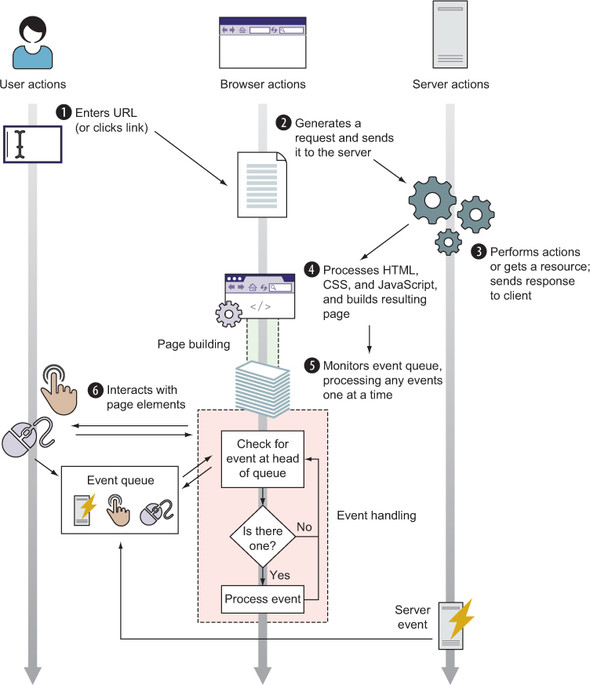
The diagram summarizes how user- and server-generated events enter the queue and are processed one at a time. section 2.3.1
