Click a React button and its onClick handler receives an event object. That object is a synthetic event: React’s wrapper around a native browser event. It gives handlers a consistent interface across browsers rather than passing along a browser-specific event object. section 1.1.1 section 8.2.3
Use one handler for two buttons
A shared handler can inspect the event target to decide which button was clicked: const increment = useRef(); const onClick = (evt) => { const delta = evt.target === increment.current ? 1 : -1; setCounter((value) => value + delta); }; <button ref={increment} onClick={onClick}>Increment</button> <button onClick={onClick}>Decrement</button> Here, evt.target is the clicked node. Separate handlers would work too; choose whichever makes the component clearer. section 8.2.2
The event object helps a handler answer questions or change what happens next:
- Read target to identify where the event occurred, or type to distinguish events handled by the same function. section 8.2.2
- Inspect event-propagation information, prevent the browser’s default action, or stop further propagation when needed. section 8.11
Keep a reusable component’s public callback separate from its internal event handler when callers do not need the event. Assigning a callback directly to onClick passes it the event object; wrapping it lets the component call the callback without arguments. section 8.6
Figure 8.4 React doesn’t add a listener on the individual node, but listens to any event on any node, unlike native DOM listeners.
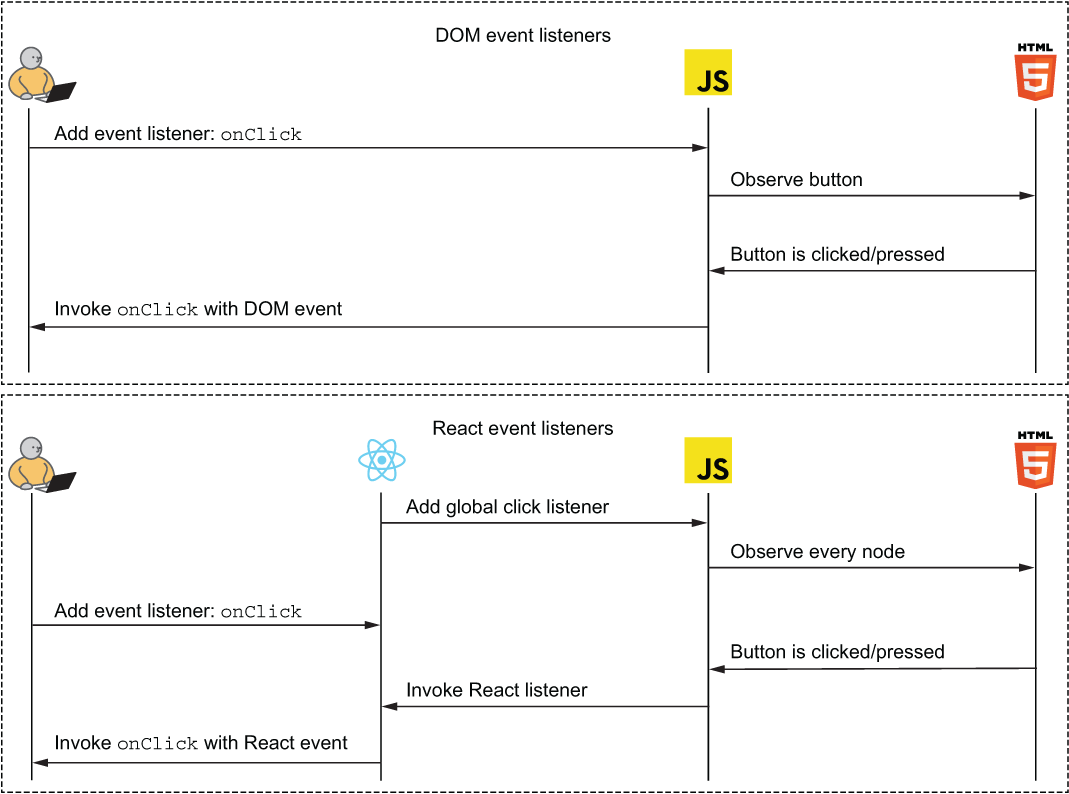
The diagram contrasts a native listener attached to an individual node with React’s event-handling arrangement. It helps explain why a JSX listener receives a React event object rather than a DOM event object directly. section 8.2.3
