When a click has listeners on both a paragraph and its ancestors, the event phase determines their order. A DOM event travels in three phases: capture moves down from the window and document toward the target; target reaches the clicked element; bubble moves back up through its ancestors. section 6.2.13
Use addEventListener with { capture: true } to listen on the way down. Listeners use the bubble phase by default. At the target, both capture and bubble listeners can run. Choose the listener’s node and phase according to when it should respond; stopPropagation() halts the remaining path, while stopImmediatePropagation() also skips remaining listeners on the same element. section 6.2.13
Figure 6.2 A diagram of a DOM and what happens when the user clicks a paragraph element. The event first travels down in the capture phase, reaches the target, then travels back up in the bubble phase. Several listeners can react to the same event, executing in order across the phases.
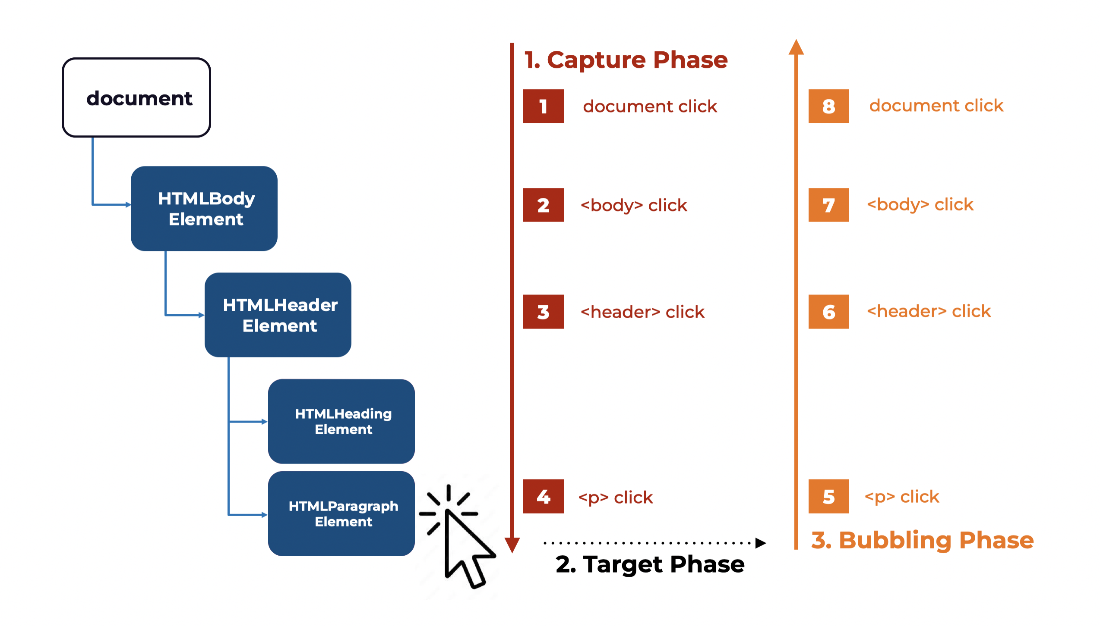
Follow the click from the document down to the paragraph, then back through its ancestors. section 6.2.13
