liveBook · Manning

Excalidraw

As explained in Coding with AI

A browser-based tool for creating and editing hand-drawn-style diagrams.

Excalidraw turns application-flow descriptions into hand-drawn-style diagrams that are quick to review and share with UI designers. A Mermaid chart can be imported to create the diagram instantly, making a rough workflow easier to discuss and refine. section 7.3

Map a practice-test workflow

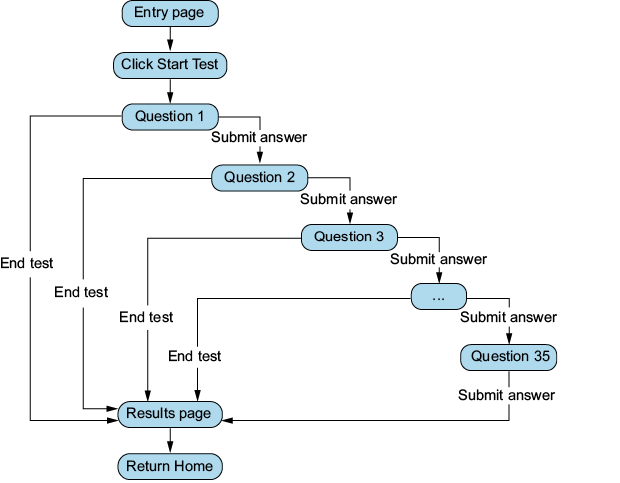
A Mermaid flowchart maps an entry page to 35 question pages, with users submitting answers or ending the test before reaching the results page and returning home. Importing that chart into Excalidraw produces a diagram of the application’s workflow. Treat the first result as a starting point: crude prompts may work, but missing context often requires revisions. section 7.3

Figure 7.4 Our application’s workflow
A diagram of a test

Description automatically generated

Inspect the practice test’s complete workflow diagram, including question progression, early termination, results, and return-home paths. section 7.3

How Coding with AI covers it

How deep it goes
Demonstrates Mermaid import and instant diagram creation, while deferring detailed diagram options to Mermaid references and related tools.
Examples
Uses a 35-question HAM radio practice test with entry, question, results, and return-home states.
What it assumes
Assumes a flow description or Mermaid chart, but remains understandable even without prior Mermaid experience.
What you can do after
Apply it via Excalidraw to turn a Mermaid application flow into a diagram for review.
How it connects
Connects Mermaid flowcharts, Draw.io, UI design, and application workflow documentation.

Related concepts

This explainer was generated by Manning's knowledge graph from the text of Coding with AI. The section links point to the parts of the book it draws on.