An exchange is a RabbitMQ message-routing component. Producers send messages to an exchange with a routing key; the exchange then sends them to one or more queues according to its type and bindings. section 9.2
Figure 9.2 Messages sent to a RabbitMQ exchange are routed to one or more queues, based on routing keys and bindings.
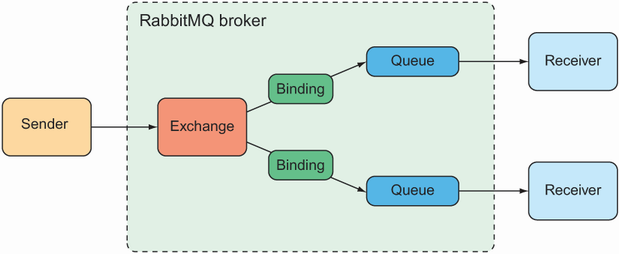
This diagram shows the essential path: messages enter an exchange, then reach queues through bindings and routing-key decisions. section 9.2
Choose the exchange type according to the routing behavior you need:
- Default routes a message to the queue whose name matches its routing key; RabbitMQ automatically binds every queue to it. section 9.2
- Direct routes to queues whose binding key exactly matches the message’s routing key. section 9.2
- Topic routes to one or more queues when binding keys, including wildcard patterns, match the routing key. section 9.2
- Fanout sends messages to every bound queue without considering routing or binding keys. section 9.2
- Headers routes according to message-header values, while dead-letter exchanges collect undeliverable messages. section 9.2
Spring applications send through RabbitTemplate using an exchange and routing key rather than a queue destination. Methods without an exchange use the default exchange; methods without a routing key use a default routing key. section 9.2.2
Sending a taco order
A messaging service can send an order object through the named exchange with rabbit.convertAndSend("tacocloud.order", order). RabbitTemplate converts the object into a message before handing it to RabbitMQ. A configured exchange and routing key can also be supplied through Spring configuration. section 9.2.2


