An EXEC mode is a Cisco IOS command-line level that controls which commands are available and whether device operations can be performed. User EXEC mode uses a > prompt and provides basic viewing commands; privileged EXEC mode uses # and permits more powerful operational commands. section 5.2.1
Use the prompt and command behavior to identify the mode:
- User EXEC mode: run commands such as show clock, but not intrusive commands such as reload. section 5.2.1
- Privileged EXEC mode: enter with enable, run reload and other operational commands, and return with disable. section 5.2.1
- Configuration changes require leaving EXEC modes with configure terminal and entering global configuration mode. section 5.2.2
- Use ? to list commands or command keywords available in the current mode. section 5.2.4
Recognizing and changing modes
Router> enable Router# reload Proceed with reload? [confirm] The prompt changes from > to # after enable, and reload becomes available. To configure the device, enter configure terminal; the prompt then becomes Router(config)#. section 5.2.1 section 5.2.2
Figure 5.6 How to navigate between user EXEC mode, privileged EXEC mode, and global configuration mode in the Cisco IOS command hierarchy
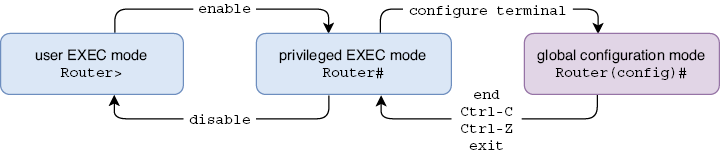
Shows navigation among user EXEC mode, privileged EXEC mode, and global configuration mode. section 5.2.2
