exec-timeout is a Cisco IOS line-configuration command that disconnects an inactive CLI session after a specified period. The default is 10 minutes. section 5.1.1 section 5.4
Configure the timeout from line configuration mode:
- Select the relevant line, such as line con 0 for the console or line vty 0 15 for remote sessions. section 5.1.1 section 5.2.2
- Enter exec-timeout minutes; for example, exec-timeout 20 disconnects the session after 20 minutes of inactivity. section 5.2.2
- Use exec-timeout 0 to disable the inactivity timer. section 5.4
Apply and verify a VTY timeout
SW1(config)# line vty 0 15 SW1(config-line)# exec-timeout 20 The running configuration can show exec-timeout 20 0 under each configured VTY-line group, such as lines 0–4 and 5–15. section 5.2.2
Figure 5.5 Enabling Telnet on SW1. Users must log in with a local user account and will be logged out after 20 minutes of inactivity. Only Telnet can be used to connect to the VTY lines, and only hosts in 192.168.1.0/24 are permitted.
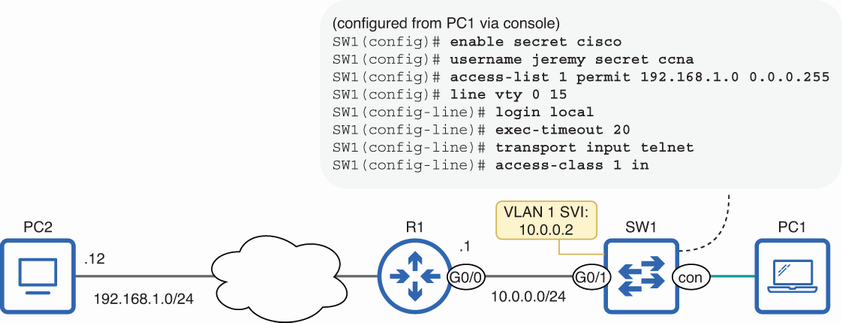
Relates the 20-minute timeout to Telnet access, local authentication, permitted protocols, and an access-class restriction. section 5.2.2
