An exit selection contains document elements whose associated data items no longer appear in the updated dataset. In D3, these elements must leave the visualization, such as circles representing cetaceans excluded by a filter. section 7.4.2 section 7.5
Use the exit selection as one part of D3’s data-update lifecycle:
- Bind updated data with data(updatedData, d => d.uid) so persistent data remains associated with the same visual elements. section 7.4.2
- Let join() handle the lifecycle automatically, or pass separate enter, update, and exit functions when each state needs different behavior. section 7.4.2
- Apply a transition to exiting marks when a filter changes, creating a visible departure instead of an abrupt disappearance. section 7.4 section 7.4.2
Filtering a cetacean scatterplot
A scatterplot initially displays all cetacean species. Selecting a hemisphere filter produces a smaller dataset; circles for species no longer included form the exit selection and move downward as new circles enter from above. A key function keeps continuing species attached to their existing circles. section 7.4 section 7.4.2
Figure 7.15 Visualization of cetacean species that we’ll build in this section
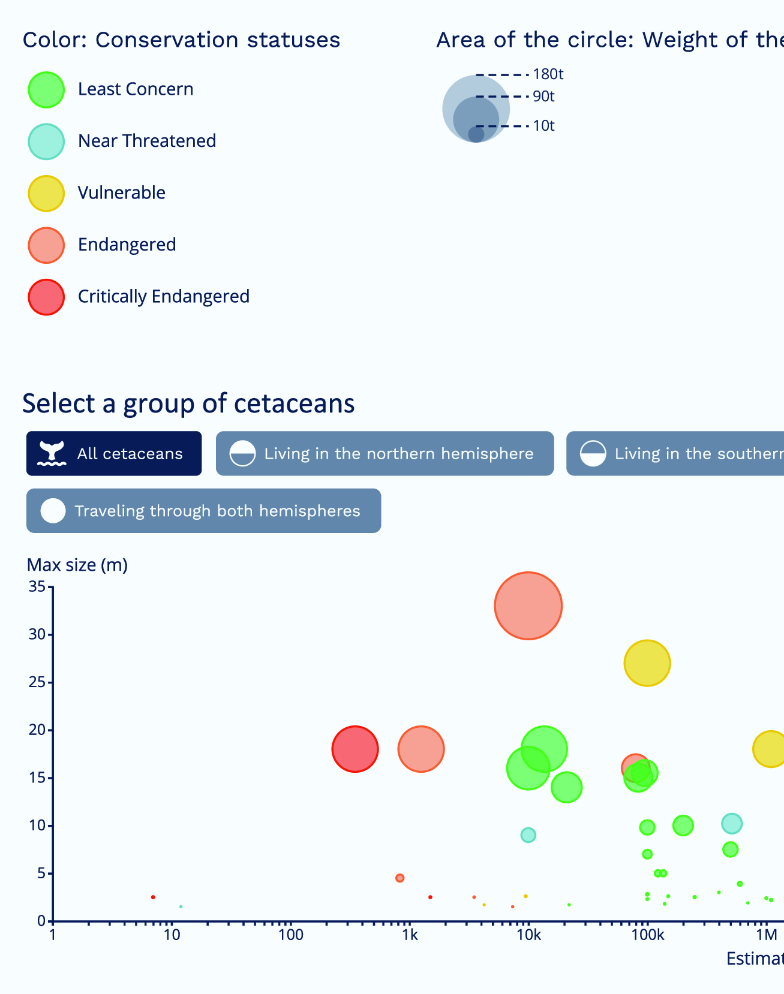
Use the visualization to see how filtering changes the displayed set of cetacean marks. section 7.4
