An expert annotator reviews difficult cases, helps shape annotation guidelines, and supports quality control. When data changes quickly, experts can inspect new examples before the main team so guidance keeps pace. section 7.2.4
Choose an expert workflow to match how stable the data is:
- For a pilot, omit confusing items rather than risk incorrect labels. section 7.2.4
- For fairly consistent data, redirect hard examples to experts for review. section 7.2.4
- For rapidly changing data, have experts seek edge cases before general annotation, update guidelines, and review some random items for quality control. section 7.2.4
Figure 7.4 Three workflows for in-house annotation. The top workflow is recommended only for pilots; it doesn’t use in-house annotators and ignores items that are hard to annotate. The second example is the most common in industry: hard examples are redirected to experts for human review. This approach works fine if you have data that is fairly consistent over time. If your data is changing quickly, the third method is recommended. In this method, the expert annotators are looking for potential new edge cases with diversity sampling and uncertainty sampling before the main annotation process happens; then these examples and updated guidelines are passed to the main annotation team. This method is the only one that ensures that the guidelines are not trailing the actual data. The expert annotators also annotate some randomly selected items for quality-control reasons that we will cover in chapter 8.
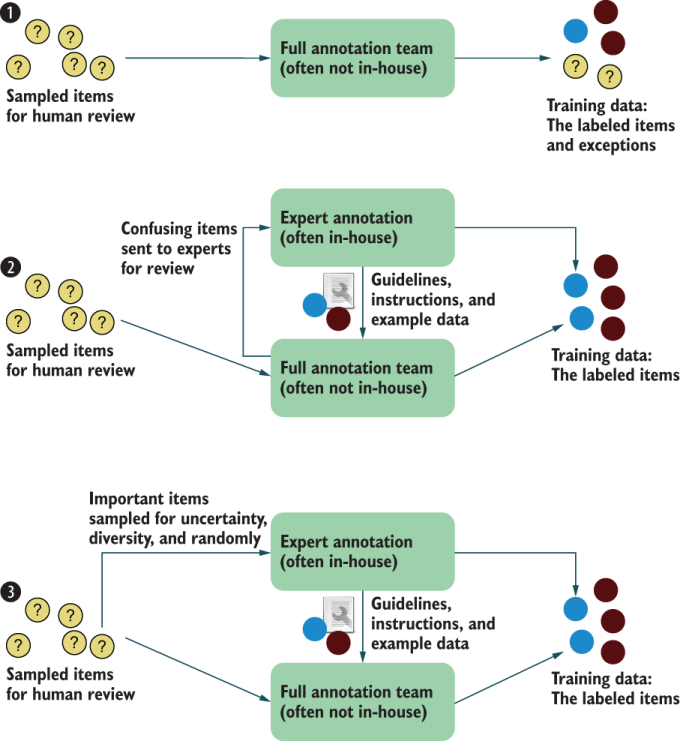
Compare three workflows for involving experts, from a pilot that excludes difficult items to proactive review of emerging edge cases. section 7.2.4
Identify potential experts by tracking individual annotator accuracy, not only dataset-level accuracy. Build toward expert adjudication by first letting selected annotators review others’ work. Check expert-pool demographics for representation, while respecting privacy; otherwise, agreement-based selection can carry pool biases into the expert group. section 8.4.2 section 8.4.2