An explicit grid is the set of row and column tracks defined with the grid-template-* properties. It establishes the known structure of a CSS Grid before items are placed. Items placed beyond those declared tracks cause the browser to generate implicit tracks, so an explicit grid can expand when the content requires it. section 5.4 section 5.0
Keep these distinctions in mind when choosing how much of a grid to define:
- Use explicit tracks when the grid’s rows and columns are known and should be declared directly. section 5.4
- Allow implicit tracks when the number of items is unknown or when items need to create additional rows or columns. section 5.4
- Remember that implicit tracks are auto-sized by default; grid-auto-rows and grid-auto-columns can assign them another size. section 5.4
Photography portfolio with explicit columns
A portfolio can define its columns while leaving the rows implicit: .portfolio { display: grid; grid-template-columns: repeat(auto-fill, minmax(200px, 1fr)); grid-auto-rows: 1fr; }. The declared columns form the explicit grid; as photographs wrap onto new lines, additional rows are generated automatically. section 5.4
Figure 5.11 If a grid item is placed outside the declared grid tracks, implicit tracks will be added to the grid until it can contain the item.
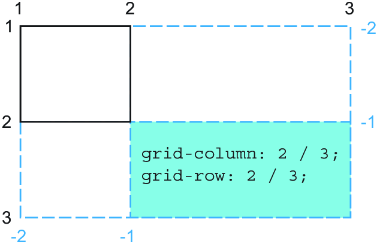
See how placing an item outside the declared tracks causes implicit tracks to be added until the grid can contain it. section 5.4
