F# Interactive (FSI) is F#’s stateful REPL for evaluating expressions incrementally. It supports rapid experimentation, lightweight package exploration, data analysis, and cheap feedback before code moves into an application. section 2.5.1 section 2.5.2
Use FSI to:
- Evaluate expressions by entering them at the prompt and terminating commands with two semicolons (;;). section 2.5.2
- Bind values with let and reuse them in later commands, including interpolated strings and function definitions. section 2.5.2 section 2.5.4
- Load data, reference F# files or packages, and write complete programs interactively. section 2.5.2
- Move experimentation into .fsx scripts, then send selected lines or blocks to FSI with editor support. section 2.5.3
A small stateful session
Start FSI from a terminal with dotnet fsi, then enter: let version = 6;; $"F# {version} is cool!";; FSI reports the expression result and retains version for the next command. An unbound expression such as 1 + 1;; is assigned to the default symbol it. Leave the session with exit 0;;. section 2.5.2 section 2.5.4
The prompt is useful for quick checks, but a .fsx script provides syntax highlighting, autocomplete, and a reusable record of the experiment. In VS Code, FSI: Send Selection evaluates selected code in the F# Interactive terminal. section 2.5.3
State belongs to the running FSI session, not automatically to the script. After restarting FSI, expressions must be sent again in dependency order or later commands can fail because earlier bindings are unknown. section 2.5.4
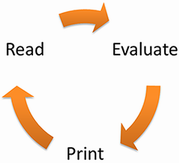
Use the REPL-cycle figure to visualize the repeated pattern of entering code, evaluating it, inspecting results, and refining the next experiment. section 2.5.1
