Failover transfers database service from a primary host to a secondary host when the primary fails or is deliberately taken out of service. The crucial distinction is operational: high availability (HA) uses automatic failover, while disaster recovery (DR) may require a manual failover process. section 13.1
Do not treat synchronized data as proof that failover will work. A secondary replica can accept service yet perform too poorly for users, lack required SYSTEM permissions, or fail health monitoring because encryption settings conflict. Test under controlled conditions rather than discovering these gaps during an outage. section 13.3
Choose the failover pattern to match the availability requirement:
- Use availability groups for replica databases synchronized through log streams; automatic failover supports HA, while manual failover can support DR. section 9.11
- Use a failover clustered instance (FCI) when clustered nodes share database storage and another node can automatically take ownership after a failure. section 9.11
- Keep automatic HA close enough for synchronous replication; distant sites can add write latency because each write must complete on the secondary. section 13.1
Patch without a long maintenance window
For a 24/7 service, patch secondary cluster nodes first. Then perform a controlled failover to a patched secondary before patching the original primary. The transfer still causes an outage, but it may last only seconds rather than a full patching window. section 9.11
Figure 13.3 HA/DR topology using availability groups providing local automatic failover and cross- site manual failover
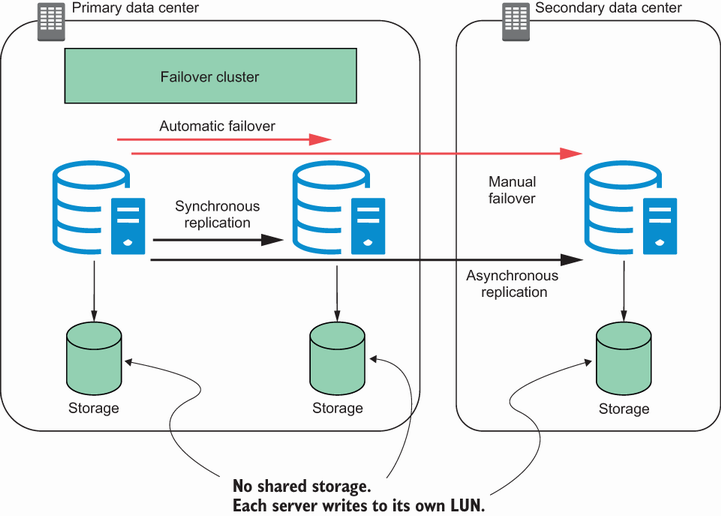
Compare local automatic failover with cross-site manual failover in a combined HA/DR topology. section 13.1





