liveBook · Manning

LLM Agent Inspector

As explained in Build a Multi-Agent System (from Scratch)

LLM Agent Inspector is a book-specific developer tool that provides an interface for supervising LLM agent task execution.

LLM Agent Inspector is a narrowly scoped developer tool for supervising an LLM agent’s task execution through a browser interface. section 8.4.3

To launch a supervised run:

  • Install the tool from PyPI and prepare a Python script that defines an LLMAgentBuilder as agent_builder. section 8.4.3
  • Optionally define a default_task of type Task to load a task for testing. section 8.4.3
  • Run agent-inspector launch with the script path; the tool locates agent_builder and opens its UI in a browser. section 8.4.3

A Hailstone task

A sample script builds an agent with a next_number tool and sets a default task to compute the Hailstone sequence starting at 4, step by step until it reaches 1. section 8.4.3

Figure 8.12 The LLM Agent Inspector developer tool, cycling through get_next_step() and run_step() for a supervised task execution.
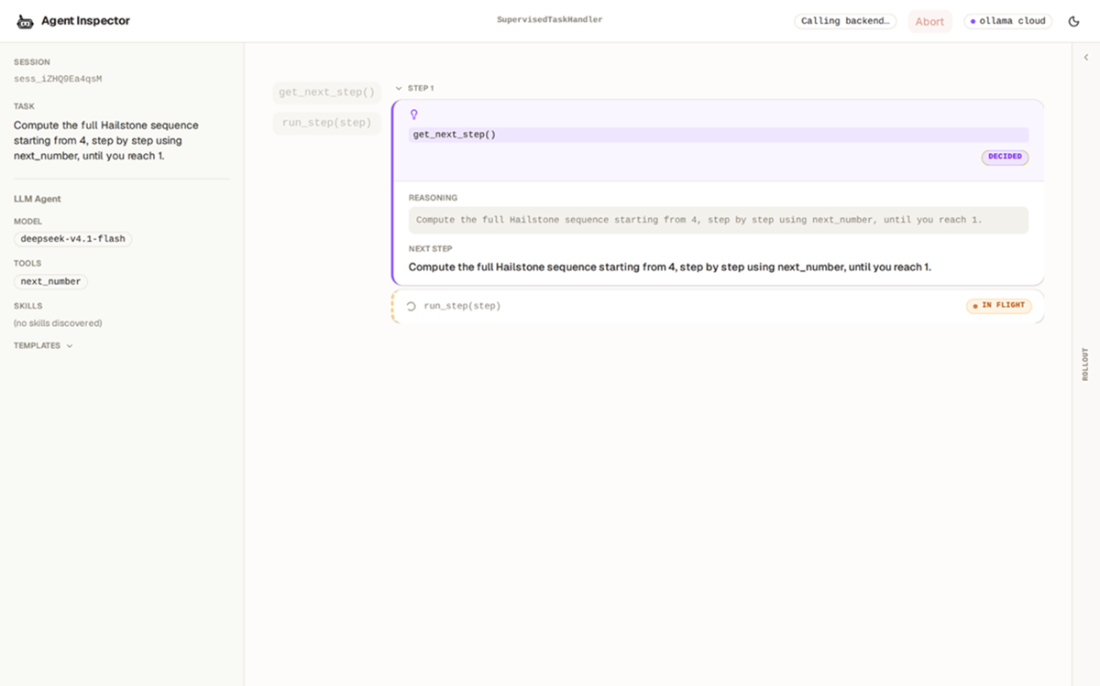
The interface cycles through get_next_step() and run_step() during supervised execution. section 8.4.3

How Build a Multi-Agent System (from Scratch) covers it

How deep it goes
Details installation, script configuration, launch, and supervised execution, while remaining a narrowly scoped interface.
Examples
Demonstrates a Hailstone-sequence task starting at 4 with a next_number tool.
What it assumes
Requires a Python script defining an LLMAgentBuilder; a default Task is optional.
What you can do after
Operate supervised runs by defining an agent script and launching it with the agent-inspector CLI.
How it connects
Connects Supervised-Execution HITL with LLMAgentBuilder, SupervisedTaskHandler, and LLMAgent.run_supervised().

Related concepts

This explainer was generated by Manning's knowledge graph from the text of Build a Multi-Agent System (from Scratch). The section links point to the parts of the book it draws on.