UseSubAgentTool dispatches a task to a named subagent registered with an LLM agent. It operates over a registry of SubAgentSpec objects, which specify each subagent’s model, tools, and intended tasks. A fresh subagent instance handles each dispatch; its result returns to the calling agent as a tool result, without sharing its execution trajectory. section 9.2 section 9.5
The tool subclasses AsyncBaseTool and receives its registry at construction. Its name is from_scratch__use_subagent, and its description directs the agent to the subagents catalog in the system message. section 9.2.2
A dispatch follows this flow:
- The LLM supplies a name and task instruction. The JSON schema requires both strings and restricts name to the registered keys. section 9.2.2
- The tool validates the ToolCall. Validation errors are returned in a ToolCallResult with an error flag and serialized details. section 9.2.2
- On successful validation, the tool builds a fresh subagent and calls run() with a new Task containing the instruction. The result or run errors are packaged in a ToolCallResult. section 9.2.2
Listing 9.3 Implement UseSubAgentTool: parameters_json_schema
# llm_agents_from_scratch/subagents/tools.py
… #A
from typing import Any

class UseSubAgentTool(AsyncBaseTool):
   … #B

    @property
    def parameters_json_schema(self) -> dict[str, Any]:
        """JSON schema for tool parameters."""
        return {
            "type": "object",
            "properties": {
                "name": { #C
                    "type": "string",
                    "enum": sorted(self._subagents_registry),
                    "description": (
                        "Name of the subagent to dispatch the task to."
                    ),
                },
                "task": { #D
                    "type": "string",
                    "description": "The task instruction for the subagent.",
                },
            },
            "required": ["name", "task"],
        }
The parameter schema derives the allowed subagent names from the registry. section 9.2.2
LLMAgent builds its registry from supplied specifications at construction and rejects duplicate names. TaskHandler creates UseSubAgentTool only when the registry is nonempty, adds it to the available tools, and exposes a formatted subagent catalog in the system message. The registry remains fixed across task runs. section 9.2.3
Figure 9.7 The sequence of interactions between the TaskHandler, the UseSubAgentTool, and the dispatched subagent
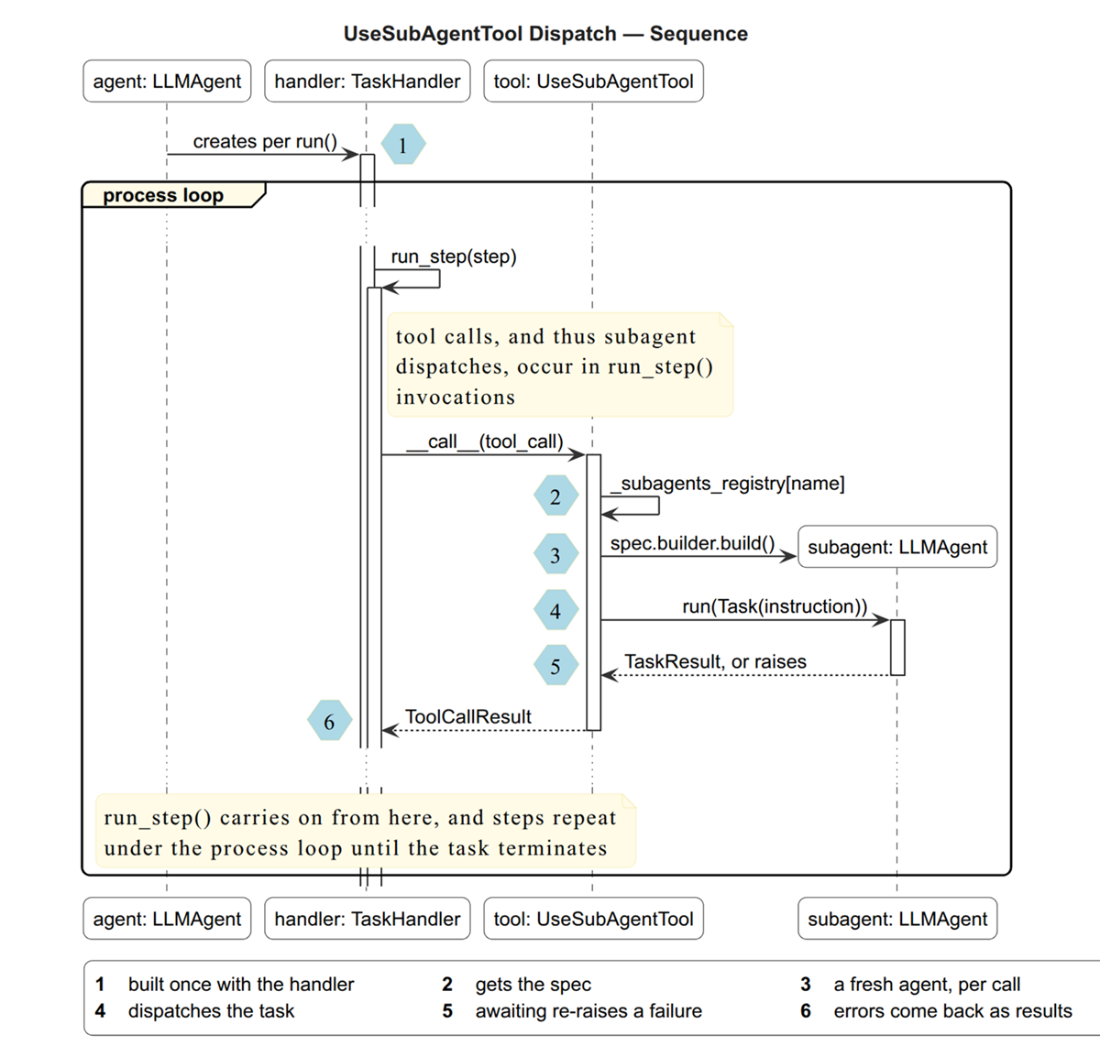
The interaction sequence connects TaskHandler, the dispatch tool, and the subagent. section 9.2.3
Dispatch a Hailstone subagent
Register a hailstone subagent with a next_number tool, then ask a coordinator to determine the sequence starting at 5. The coordinator dispatches the subagent, which returns 5 → 16 → 8 → 4 → 2 → 1: five steps. section 9.2.2 section 9.2.3
