Feast is an open-source feature store for sharing and serving prepared machine-learning features. Instead of rebuilding feature joins separately for training and inference, teams register feature definitions and retrieve features through a common interface. This helps limit training-serving skew and keeps feature generation separate from modeling. section 1.3.3 section 4.2
Figure 4.10 Feast feature store design involves a feature pipeline populating the offline store and periodically Feast materializes the offline features to the online store. The feature registry holds feature definitions along with online and offline store information. The Feast SDK provides methods to retrieve features from online and offline stores, which can be used for training and inference purposes.
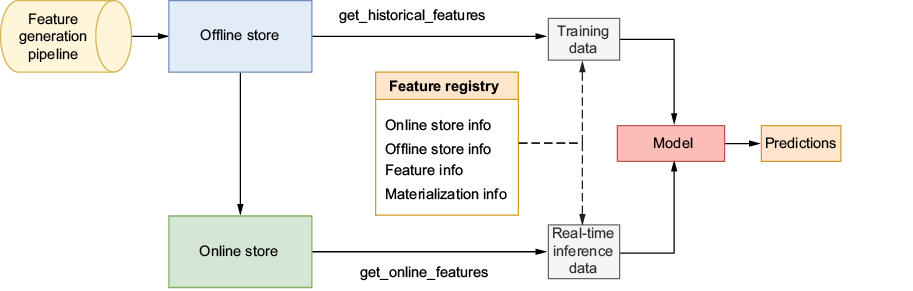
The architecture separates feature computation from retrieval: a pipeline fills an offline store, Feast materializes features to an online store, and a registry holds the definitions used by the SDK. section 4.2
Historical retrieval must select the feature value available at the requested time. If a user's values were recorded on January 7, May 21, and December 4, a request for May 22 should use May 21—not the later value. Feast provides point-in-time feature sets rather than requiring a separately maintained join query. A feature view's time to live (TTL) limits how far back that lookup can search. section 4.2 section 4.2.1
A practical setup has three parts:
- Define an entity such as `user_id`, then group related fields in FeatureViews with a source and TTL. Demographic, relationship, and occupation features can be separate views. section 4.2.1
- Point FileSources at prepared Parquet files in MinIO. Configure the registry, a file-based offline store, and a Redis online store in `feature_store.yaml`; run `feast apply` to register the definitions. section 4.2.1
- Use offline features for historical training data and materialize them to the online store for low-latency inference. Run `feast ui` to inspect registered entities, views, sources, and tags. section 4.2 section 4.2.4
Listing 4.11 Feature store configuration
project: my_feature_repo
registry: s3://feature-registry/registry_local.db    #1
provider: local    #2
offline_store:
  type: file    #3
online_store:
  type: redis    #4
  connection_string: "localhost:6379"
The configuration listing shows the concrete store split: an S3-path registry, a file offline store, and a Redis online store. section 4.2.1
Registration and serving are only part of the workflow. New feature data and model retraining still need automation; Kubeflow pipelines are used to orchestrate that work alongside Feast and MLflow. section 4.2.4 section 4.0
