A fixed parameter supplies a predetermined value that the person or script initiating automation cannot change. Use it when a setting should remain consistent across executions. section 10.5
When designing virtual machine creation automation, classify each input as mandatory, fixed, optional, or logical. Fixed values simplify the interface and prevent unnecessary variation. section 10.5
Disabling automatic checkpoints
Set automatic checkpoints to a fixed disabled value when they should never be created during virtual machine provisioning. If requirements change, enable them manually after creation rather than exposing the setting to every automation caller. section 10.5
Figure 10.2 Hyper-V virtual machine creation parameters broken down into buckets for mandatory (values that must be supplied), optional (values that have a default value but can be overwritten by the user), fixed (values that are hardcoded), and logical (values that are determined by logic in the script)
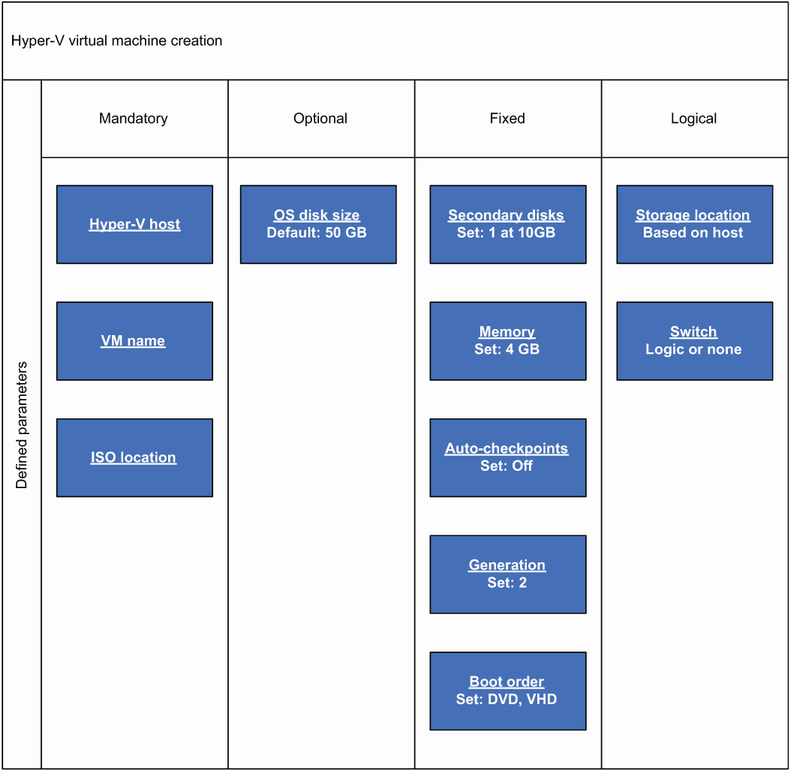
Compare fixed parameters with mandatory, optional, and logical values when deciding which virtual machine settings callers can control. section 10.5
