Flannel is a Kubernetes container network interface (CNI) plugin that connects pods across nodes through an overlay network. It runs as a DaemonSet, creates a virtual network interface in each node’s root namespace, and uses packet encapsulation to route traffic to the correct destination. section 2.3.2 section 6.5
Use Flannel operationally to:
- Install or replace the cluster CNI when configuring Kubernetes networking. section 2.3.2
- Provide pod-to-pod communication when pods are scheduled on different nodes. section 2.3.2
- Verify the deployed plugin with kubectl get pods -A or kubectl get ds -n kube-system. section 6.5
- Distinguish Flannel from Calico when evaluating Network Policy support: Flannel does not support network policies. section 9.3.5
Install and verify Flannel in a kind cluster
Create a kind cluster without a CNI, enter each node with docker exec, install wget, download the CNI plugins archive, and extract it with tar -xvf. Confirm that the archive contains the bridge plugin, then apply the Flannel configuration. Verify the result with kubectl get po -A; healthy output includes kube-flannel pods in Running status on the nodes. section 6.5
Figure 6.14 Encapsulated packet moving from node to node via CNI
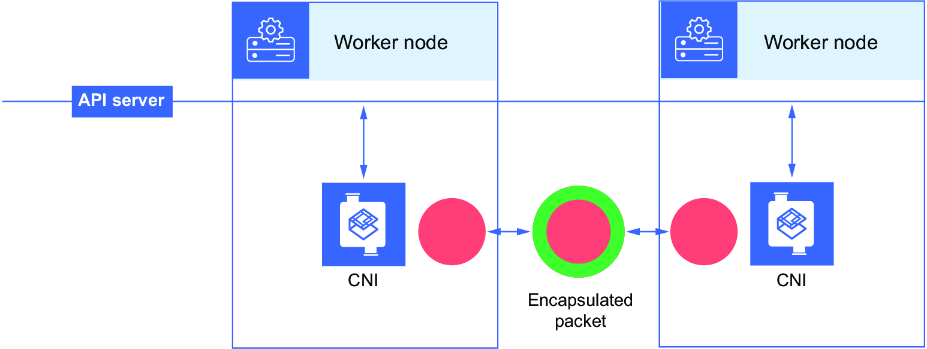
Use the diagram to trace how Flannel encapsulates traffic as it moves between nodes through the CNI overlay. section 6.5
