A follow-up question keeps an AI exchange moving toward a useful result after the first answer. Use one when the response is too general, unsuitable, incomplete, or wrong: ask for more detail, supply missing context, request a different format, or tell the AI to reconsider the answer. The goal is not to accept the first output, but to guide the conversation toward your objective. section 1.5.2
Use follow-up questions as a short refinement loop:
- Identify the gap. Say what is missing or unsuitable, such as “That’s too long; make your answer about half as long.” section 1.5.2
- Ask for a useful next view. Request elaboration, evidence, a fact-check, a step-by-step list, or a to-do list. section 1.5.2
- Add context that changes the answer. Requirements such as dietary restrictions, ingredients, site purpose, vehicle condition, or audience make the next response more targeted. section 1.5.2
- Probe one promising observation rather than restarting broadly. Ask why it matters and request several specific problems or alternatives. section 6.9.3
- Use judgment on the refined response. Treat suggestions as options to consider, especially when choosing a visual direction or typeface. section 4.1.6
Turn a general design critique into actionable feedback
After receiving a home-page critique, follow up with: “What you said about image integration was interesting. List several things that are wrong with that picture of potatoes in the context of the entire design.” This narrows the task from general improvement to relevance, contrast, placement, proportion, context, and style consistency. section 6.9.3
Figure 6.21 Somebody thought it was a great idea to stick random potatoes into the image in an arbitrary location and with a different background color. The kindest word to describe this suggestion is oblivious.
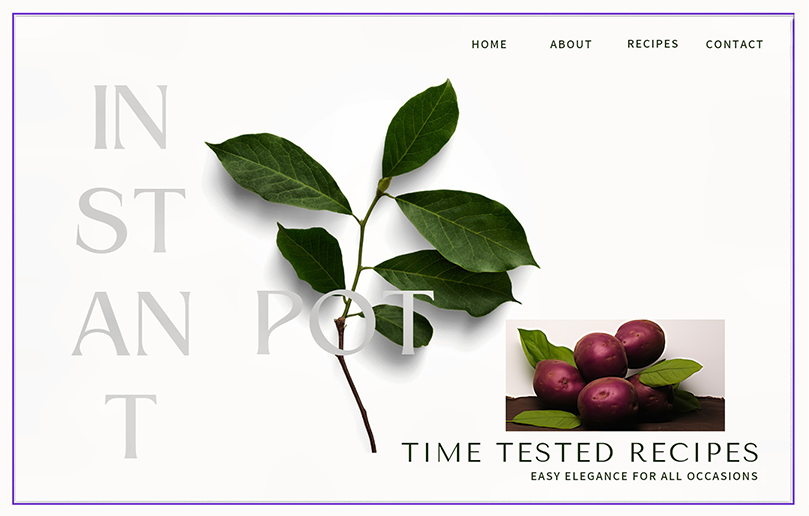
Use the home-page image to practice a focused follow-up: ask how the potato image relates to the page message, layout, background, and visual style. section 6.9.3
Ask for a more specific typography recommendation
After an AI review identifies that a site needs more personality, ask: “What alternative typefaces would you suggest to give it more personality? Taking into consideration the topic of this website.” The follow-up preserves the original goal while adding the site’s pet-and-animal context. section 4.1.6
Follow-ups can also invite the AI to gather requirements before answering. For a casserole recipe, request that it ask the necessary questions first, then provide the recipe after you answer. This makes the exchange a dialogue: the AI can ask about protein, starch, vegetables, sauce, toppings, spice level, and dietary restrictions before proposing a result. section 1.5.2
