FTP transfers files between networked systems using TCP and separate control and data connections. It supports authentication and commands for listing, navigating, renaming, deleting, and transferring files. section 8.0 section 8.2.1
FTP’s operational characteristics include:
- Uses TCP and begins with a three-way handshake for the control connection. section 8.2.1
- Authenticates with a username and password before accepting FTP commands. section 8.2 section 8.2.1
- Uses TCP port 21 for control connections; port 20 is reserved for data, although modern servers often use an ephemeral port. section 8.2.1
- Transfers file contents over a second TCP data connection, allowing multiple data transfers through one control connection. section 8.2.1
- Provides authentication but does not encrypt data; FTPS uses TLS, while SFTP is based on SSH and is not FTP. section 8.2
Copy an IOS image from an FTP server
On a Cisco IOS switch, configure default FTP credentials with `ip ftp username jeremy` and `ip ftp password password123`, then use `copy ftp: flash:`. The device prompts for the server address and source filename, retrieves the image, and reports the copied byte count. Use `show flash:` afterward to verify that the new image appears alongside the current image. Credentials may instead be supplied directly with `copy ftp://username:password@server-ip flash:`. section 8.2.2
Figure 8.4 An FTP exchange involves two TCP connections: an FTP control connection, and an FTP data connection.
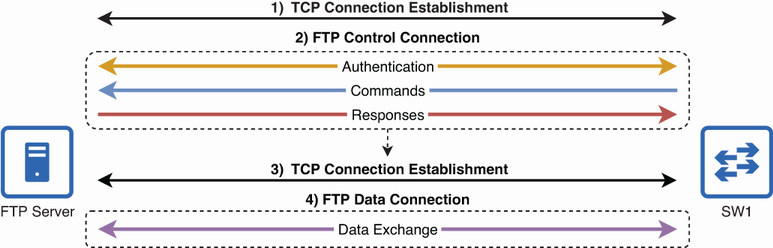
Shows the control connection and separate data connection involved in an FTP exchange. section 8.2.1
