Full tool exposure advertises every tool from every connected server on every agent request. The shortcut looks simple, but tool definitions consume tokens whether used or not, compete for attention, and make choosing the right capability harder. section 3.3.5
Prefer narrower capability delivery when the task does not require the full inventory:
- Use on-demand tool discovery so search returns only the matched tool definitions. section 3.3.5
- Use code execution when the agent must fetch, filter, and summarize many records without placing every intermediate result in context. section 3.3.5
- Use familiar CLI tools such as gh, kubectl, or psql when a protocol schema adds little value. section 3.3.5
Treat MCP as a way to provide live capabilities, not as a reason to expose everything. Curate access around the task and keep only necessary capabilities in the context. section 3.3.5
Figure 3.5 MCP Governance layers - the agent communicates through an MCP Gateway (enforcing auth and policies), which routes to an MCP Proxy (aggregating multiple servers into a curated toolset), which connects to individual MCP servers registered in a central catalog. Each layer adds security and reduces context noise.
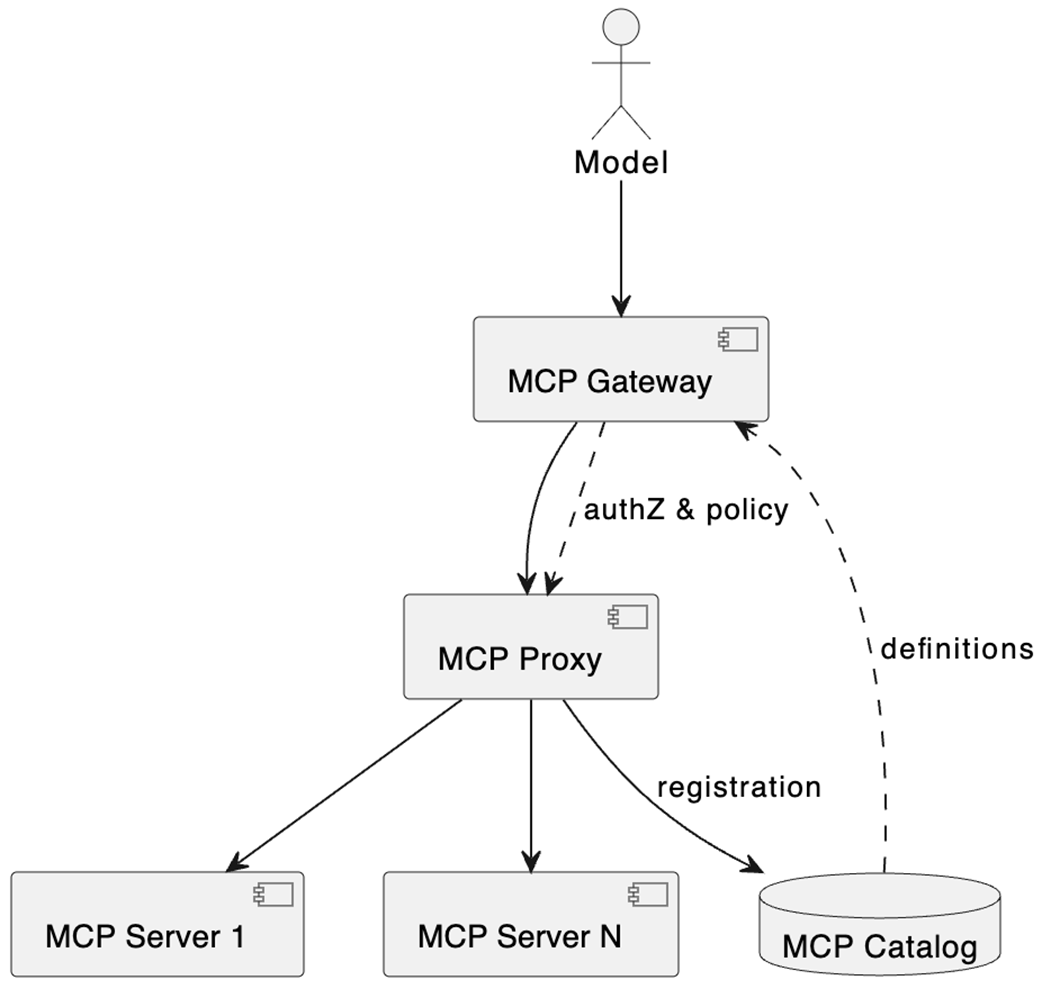
MCP governance layers add authentication, policy enforcement, server aggregation, cataloging, and context-noise reduction around exposed tools. section 3.3.5
