A general user, also called a standard user, operates with ordinary permissions rather than elevated administrative rights. In automation, the account context determines which files, registries, and system locations a script can access. section 11.4.2
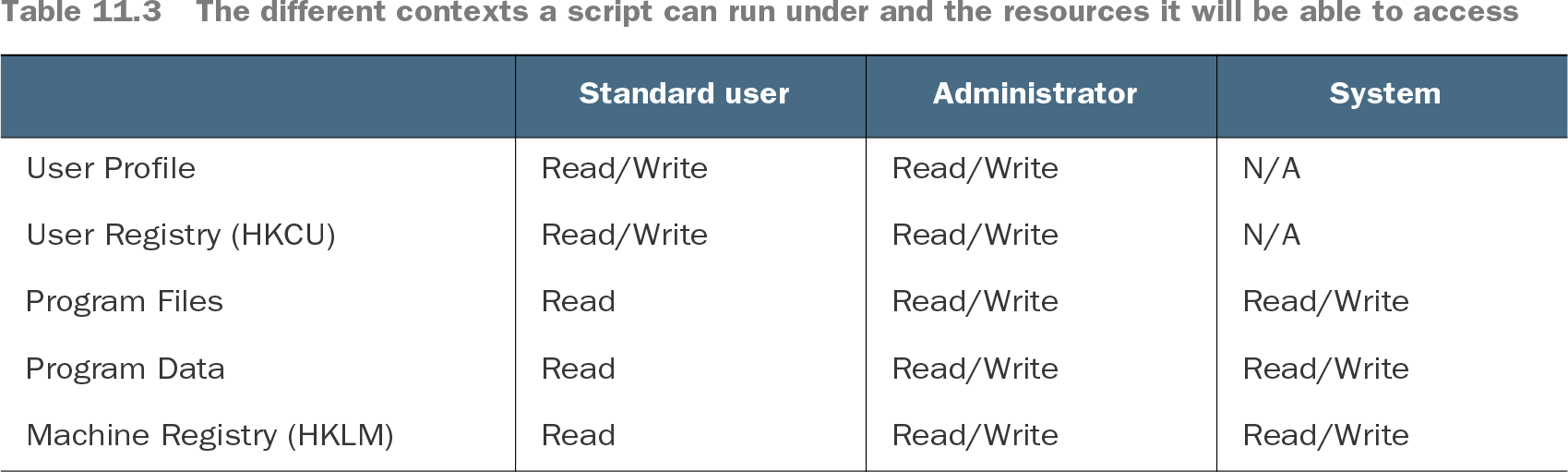
Running a script as the logged-on user supports user-specific settings but may lack elevation. A standard user can typically read Program Files and Program Data, while writes to machine-wide locations may trigger User Access Control prompts or fail. section 11.4.2
Use the standard-user context deliberately when designing and validating automation:
- Test commands first as an administrator so installation behavior and expected configuration can be verified independently of permission failures. section 11.4.2
- Run the completed script while logged on with standard user permissions to expose UAC prompts, denied writes, and user-context behavior. section 11.4.2
- Separate user-specific and machine-wide work when necessary, combining user and system executions rather than assuming one context can perform everything. section 11.4.2
- Treat remote access separately: membership in Remote Management Users permits remoting with standard-user rights unless additional server permissions apply. section 5.3.2
Testing a Git installation
Install Git and set its system-level and global configuration while elevated, verify the results with `git config --list --show-scope`, then repeat the script as a standard user. The user-context run is expected to encounter UAC prompts or fail when writing system-level configuration; restore the machine and test again under the system context as needed. section 11.4.2
Table 11.3 The different contexts a script can run under and the resources it will be able to access (view table figure)
Compare standard-user, administrator, and system access across user profiles, user and machine registries, Program Files, and Program Data. section 11.4.2