A geo_point stores a location as longitude and latitude so Elasticsearch can index places such as restaurants, schools, bus stops, and houses for location-based search. section 4.6.1 section 12.1
Map a restaurant address
Define the location field as geo_point, then index coordinates for a restaurant. The object form uses lon and lat fields. section 4.6.1
Listing 4.20 Mapping schema with a field declared as a geo_point type
PUT restaurants
{
  "mappings": {
    "properties": {
      "name":{
        "type": "text"
      },
      "address":{
        "type": "geo_point"
      }
    }
  }
}
Use the mapping listing as a minimal starting point: declare address as geo_point alongside the restaurant name. section 4.6.1
After mapping, search geo_point fields with geospatial queries. A geo_bounding_box query uses top_left and bottom_right geopoints to select documents inside a rectangle; ensure their coordinates form the intended box. section 4.6.1 section 12.3
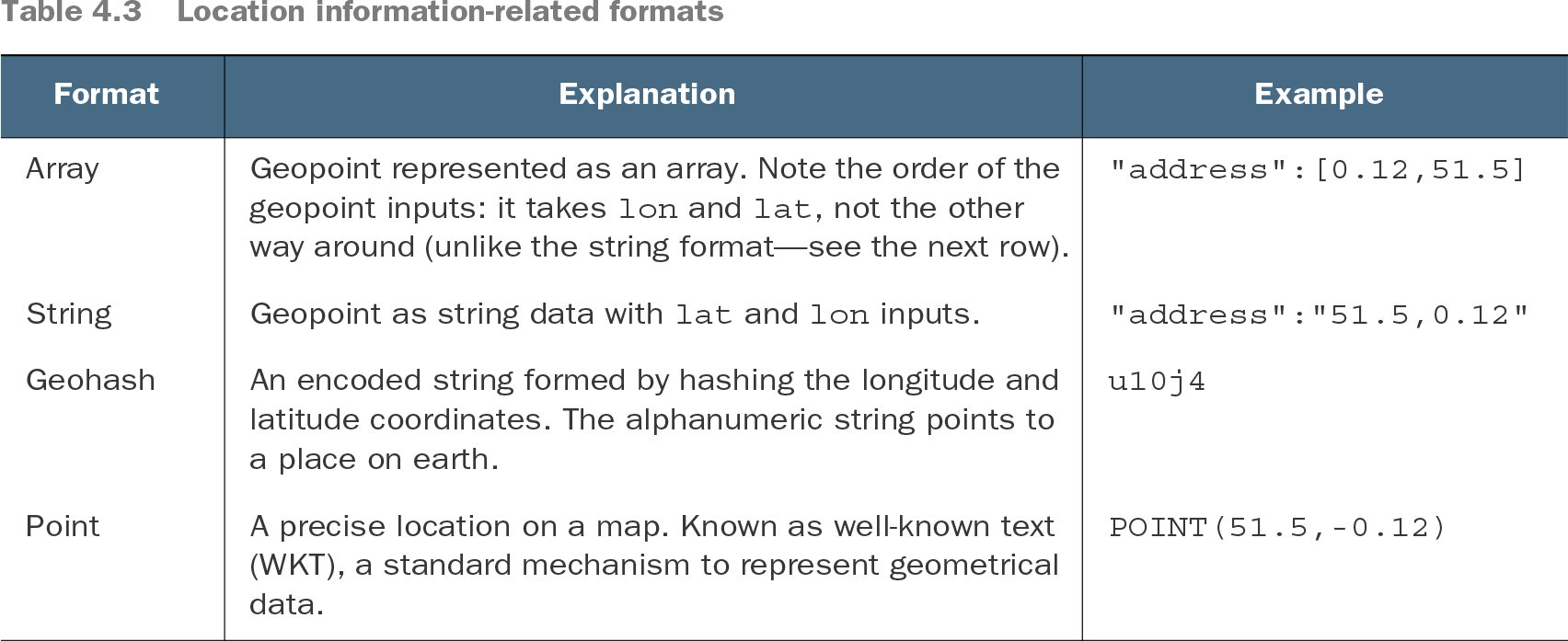
Table 4.3 Location information-related formats (view table figure)
Compare supported input formats before indexing: object, array, string, geohash, and WKT POINT. Coordinate order varies by format, so follow each format's convention. section 4.6.1 section 12.2.1