getBoundingClientRect() answers a practical UI question: where is an element in the viewport right now, and how large is it? Call it on an element to receive a DOMRect describing the element’s bounding box. This makes JavaScript geometry available when CSS layout alone is not enough for dynamic alignment or interaction. section 10.2
Figure 10.1 The return values of getBoundingClientRect()
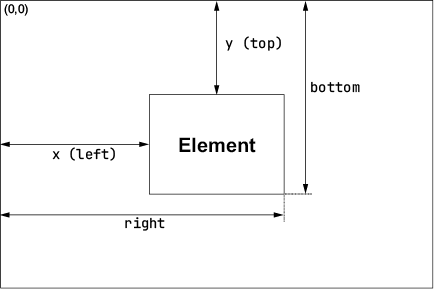
Use this property map to connect each edge and dimension to the viewport coordinate system. section 10.2
The returned rectangle supplies x and left for the distance from the viewport’s left edge, and y and top for the distance from its top edge. right and bottom locate the opposite edges. width and height include padding and borders; with box-sizing: border-box, they match the element’s CSS width and height. A bounding box can therefore be treated as a top-left point plus a size vector. section 10.1 section 10.2
Use the values as direct inputs to layout and interaction math:
- Find an element center with centerX = (rect.left + rect.right) / 2 and centerY = (rect.top + rect.bottom) / 2. section 10.6
- Center an overlay by subtracting half its width from the target’s horizontal center; place it above the target with top minus the overlay height and a gap. section 10.2.2
- Convert a pointer from viewport coordinates to local element coordinates with event.clientX - rect.left and event.clientY - rect.top. section 13.1.3
- Normalize local coordinates by dividing by rect.width and rect.height, then clamp them to a 0–1 range when mapping interaction to values. section 13.1.3
Centering a tooltip over a button
Measure both elements, calculate the button’s center, then offset the tooltip by half its own width. For a tooltip above the button, use buttonRect.top - tooltipRect.height - 8 for top. The result remains centered even when the two elements have different widths. section 10.2.2 section 10.5
Mapping a click to a color
A gradient color picker first subtracts rect.left and rect.top from clientX and clientY. Dividing those local values by width and height produces horizontal and vertical proportions, which can drive hue and lightness. This same subtraction fixes the common error of adding the element offset instead. section 13.1.3 section 13.4
Bounding rectangles also support effects based on distance from an element’s center. A hover effect can subtract the computed center from pointer coordinates, use Math.atan2() for direction, and compare pointer distance with the rectangle’s half-width and half-height to scale rotation. For scroll-driven parallax, an initial rectangle position can seed each layer’s geometry; scroll updates can be throttled with requestAnimationFrame(), while reduced-motion preferences and smaller screens can disable the effect. section 10.2.3 section 10.2.4
The key distinction is coordinate space: pointer client coordinates and DOMRect edges are both viewport-relative, so they can be subtracted directly. Once converted to local coordinates, values can be expressed as pixels, percentages, angles, distances, or CSS transform inputs. section 13.5 section 10.6
