Giraffe is an F#-focused layer over ASP.NET Core for server-side web applications. It keeps the application-facing model small: instead of centering code on numerous object-oriented ASP.NET abstractions, it represents request handling with composable HTTP handlers. This lets functional code sit on ASP.NET Core while retaining its reliability and performance foundations. section 13.1.1 section 13.2
Figure 13.2 The ASP.NET Core stack contains a low-level, high-performance web server called Kestrel, upon which core abstractions exist. Finally, developer-level frameworks exist, such as MVC and Giraffe.
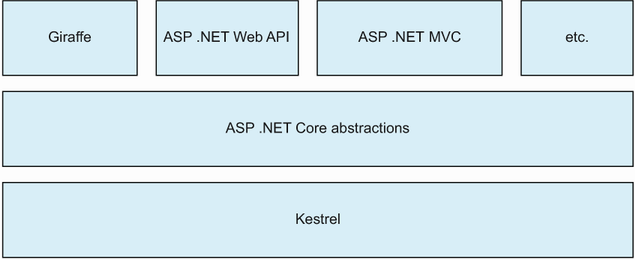
Giraffe sits above ASP.NET Core’s lower-level server and core abstractions, alongside developer-facing frameworks such as MVC. section 13.1.1
An HTTP handler takes an HTTP context and participates in an asynchronous pipeline. It may stop processing, finish with the current response, or delegate to the next handler. Handlers commonly act as filters that test request details, such as a verb or path, or as writers that set a response body, status code, headers, or JSON. section 13.2.2
Build an endpoint by joining small handlers with the `>=>` operator, an alias for `compose`:
- Use a filter such as `GET` to allow only the required HTTP method. section 13.2.2
- Add `route "/device/status"` to select the request path. section 13.2.3
- Finish with `text "device is operating correctly"`, which writes plain text and sets its content type. section 13.2.3
A status endpoint
`GET >=> route "/device/status" >=> text "device is operating correctly"` forms one HTTP handler from three focused pieces. A non-GET request or a different route ends the pipeline; a matching request reaches the writer and returns the status text. The same shape can grow by chaining additional handlers. section 13.2.3 section 13.2.2
A minimal application registers Giraffe with `builder.Services.AddGiraffe()` and installs the application handler with `app.UseGiraffe giraffeApp`. The handler value is where routes and web-facing behavior live. Keep HTTP concerns separate from internal domain logic, adapting between them so the domain code is easier to test and reason about. section 13.2.1 section 13.6
Giraffe can also model HTML views directly in F#. This code-first approach stays close to HTML while allowing ordinary F# conditionals and loops in a view. A related extension supports type-safe HTML generation. section 13.4.1 section 13.6
For quick local experimentation, create a console application, add the Giraffe package, use the web SDK, run with `dotnet run`, and send requests to the local server. A REST client in an editor can exercise composed routes without leaving the development workflow. section 13.2.1 section 13.2.3
