A GitHub Actions secret keeps sensitive workflow values out of the repository and out of plain-text workflow files. GitHub stores and encrypts the value, makes it available while a workflow runs, and redacts recognized secret values from console and log output. Use secrets for passwords, signing keys, certificates, provisioning profiles, and store-upload credentials. section 12.2.1 section 12.2.4
A deployment workflow may build and sign Android and iOS apps before uploading them to their stores. Each job can read only the values it needs through expressions such as `${{ secrets.SECRET_NAME }}`. Keep the secret name descriptive and conventionally uppercase with underscores, while keeping the actual value out of YAML and source control. section 12.2.1 section 12.2.2
Prepare values for storage according to what they contain:
- Store ordinary text directly. A Google Cloud service-account JSON file is text, so its content can be uploaded as a secret without base64 encoding. section 12.2.4
- Encode binary files as base64 before uploading them because secrets can contain strings only. Decode the value back into a file during the workflow. section 12.2.2
- Treat certificate exports and private keys as sensitive files. An iOS `.p12` certificate includes the certificate and private key, then is encoded for secret storage and decoded before import. section 12.2.3
- Preserve required passwords and identifiers separately when tools need them, such as keystore passwords and aliases or App Store issuer IDs and API key IDs. section 12.2.2 section 12.2.4
Use an Android signing secret
An Android build can retrieve a base64-encoded keystore from `secrets.ANDROID_KEYSTORE`, decode it into the workspace, and pass separate password and alias secrets to `dotnet publish`. This allows the signed build to use the keystore without committing the keystore or its credentials to the repository. `$keystorebase64 = "${{ secrets.ANDROID_KEYSTORE }}"` `/p:AndroidSigningKeyPass=${{ secrets.ANDROID_KEYPASSWORD }}` section 12.2.2
Use store-upload secrets
A deploy job can pass a service-account JSON secret to the Google Play upload action. For TestFlight, it can provide App Store Connect issuer ID, API key ID, and private key from separate secrets. These values support upload steps after the Android and iOS build artifacts are available. section 12.2.4 section 12.2.4
Figure 12.7 The GitHub Actions workflow is made up of three jobs. One builds and signs the Android app, another builds and signs the iOS app, and a third one deploys the two signed builds to their respective stores. The deploy job is dependent on the two build jobs, so they must complete successfully for it to run. All jobs depend on GitHub Actions secrets for signing keys, passwords, and other sensitive data.
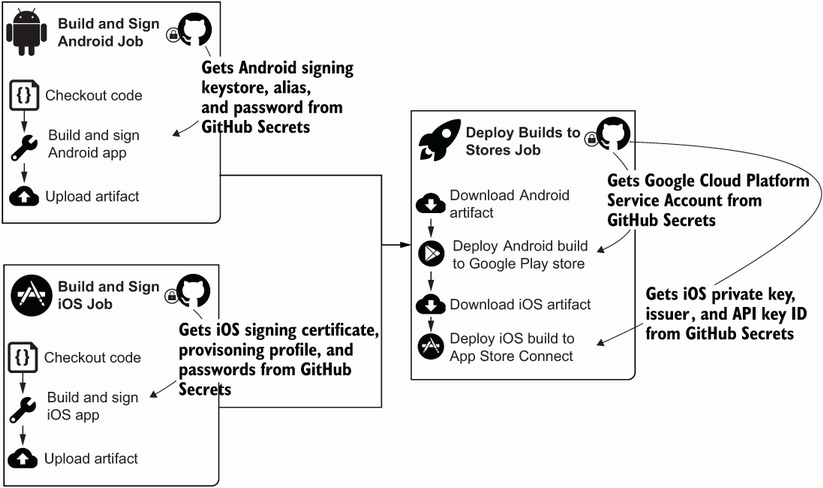
The workflow overview shows why several jobs need secrets: Android and iOS builds sign their outputs, then a dependent deploy job publishes both builds. section 12.2.1
Use the least privilege principle when creating the external credentials that become secrets. For example, assigning an Owner role merely to guarantee access is identified as a security risk; select the service-account role needed for the task instead. Also protect signing material carefully: losing an Android keystore or its password prevents uploading new versions to Google Play. section 12.2.4 section 12.2.2


