GitHub Flow is a lightweight branching workflow for delivering software: develop changes on a feature branch, review them through a pull request, merge into main, and deploy to production. section 8.3.1
Apply the workflow in this sequence:
- Create a branch such as feature/name-of-feature and commit the change there. section 8.3.1
- Run fast-feedback checks on the feature branch, such as compiling the committed sources. section 8.7
- Open a pull request when the feature is ready, then solicit feedback, complete peer review, and obtain approval. section 8.3.1
- Protect main from direct commits so every change passes through a pull request and an additional person reviews the production-bound change. section 8.3.1
- Merge approved changes into main, create container images, publish them to GitHub's container registry, and trigger a versioned release that can start continuous delivery. section 8.7
A staged workflow
A feature branch first receives compilation feedback. Its pull request then triggers testing and security quality checks. After approval and merge, image creation and registry publication produce a versioned release for the next deployment phase. section 8.7
Figure 8.4 The GitHub Flow branching strategy
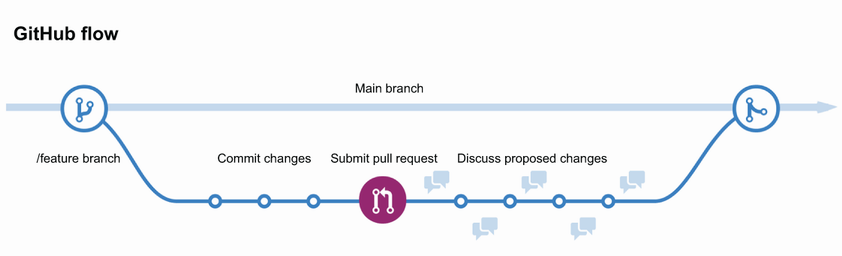
Use the branching-strategy diagram to follow the path from feature branch through pull request, merge, and deployment. section 8.3.1

