GitHub Marketplace is a discovery and publishing surface for GitHub Actions. From the workflow editor, search for an action, inspect its listing, and copy its installation template or YAML into a workflow step. section 2.3 section 2.6
Use the Marketplace to:
- Find actions such as Checkout by searching the editor’s Marketplace pane. section 2.3
- Evaluate listings through documentation, verified-creator badges, and available configuration parameters. section 2.3
- Add an action by copying its uses and with properties into a workflow step. section 2.3
- Publish an action by placing action.yml at the root of its own public repository, accepting the Marketplace Developer Agreement, and creating a categorized release. section 4.2.2 section 4.4.2
Installing and testing an action
A workflow can invoke a Marketplace action and use its output: uses: GitHubActionsInAction/ActionInAction@v1.2.1 with who-to-greet: '@wulfland'. A later step can print the answer with echo "The answer is ${{ steps.action.outputs.answer }}".
Figure 2.6 Searching in the marketplace from within the editor
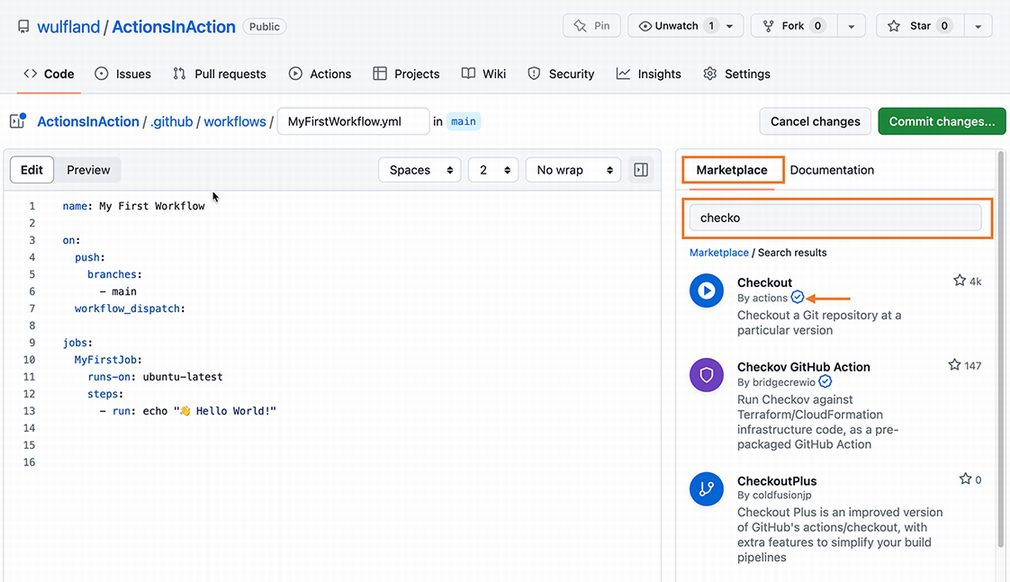
Use the editor search view to see how Marketplace actions are located before adding one to a workflow. section 2.3
Publishing favors independently managed public repositories: folder-based actions improve enterprise discoverability but cannot be published to the Marketplace, while separate repositories provide separate lifecycles and versioning. section 4.2.2
