GPU video memory, or VRAM, is the memory a graphics processor uses for display data. On the NES, the Picture Processing Unit (PPU) owns 2K of VRAM, with some cartridges able to add more. Tile and sprite patterns come from an 8K cartridge area that may be fixed ROM, bank-switched ROM, or writable RAM. section 1.2
VRAM is not ordinary CPU memory. The 6502 cannot access it directly; it sends data through PPU control ports. This matters during initialization: graphics patterns may need copying from game ROM into PPU video memory before any screen can use them. section 1.5.1 section 1.5.4
The PPU repeatedly draws the screen from VRAM. It is safest to change VRAM during vBlank, after the PPU finishes the bottom of the screen and before drawing begins again. The PPU signals this period with an interrupt, so an NMI routine can perform the needed updates; writes at other times can produce incorrect output. section 1.5.4
Figure 1.6 NES PPU chip: What is a vBlank?
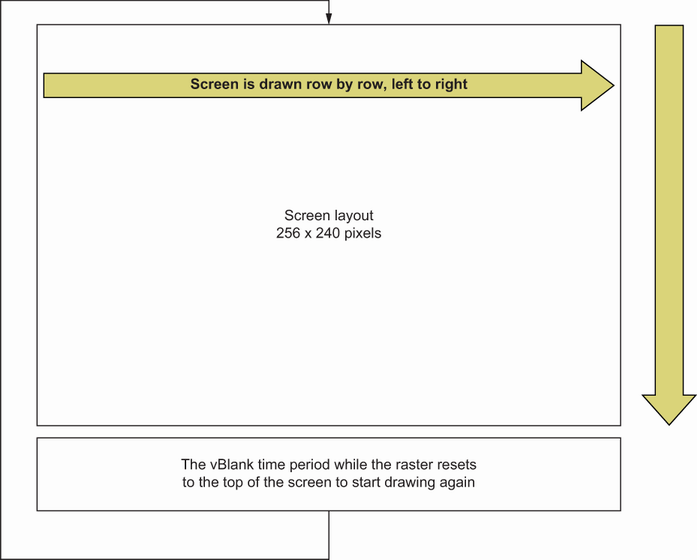
The raster-and-vBlank diagram shows why display updates must fit into the short interval between screen draws. section 1.5.4
Background screens use VRAM as name tables: 32 by 30 entries select 8 × 8 pixel tiles, making 960 tiles for a 256 × 240 display. NTSC systems refresh at 60 Hz but can hide the top and bottom tile rows; PAL systems show all rows at 50 Hz. Both the visible layout and refresh rate affect how much can be changed during vBlank. section 6.5
Because each frame permits only limited VRAM writes, practical animation favors small updates:
- Replace the tiles displayed at selected screen locations. section 13.2
- Change the colors used by background graphics. section 13.2
- Use cartridge hardware when extra VRAM is needed for additional name tables. section 16.2
Loading a title screen
Before a title screen appears, load its 8 × 8 background and sprite patterns from game ROM into VRAM. The name table can then select those patterns to form the screen, while sprites use their own loaded patterns in front of or behind the background. section 1.5.2 section 6.5
