An admin cluster is the administrative control plane for one or more user clusters. It runs the components that install, update, upgrade, scale, and delete user clusters, rather than application workloads. section 5.2 section 17.2.1
Treat the admin cluster as an infrastructure boundary:
- Deploy only the control-plane components needed to administer user clusters; do not place services there that could affect its operation. section 5.2 section 17.2.1
- Protect its security-sensitive data, including SSH keys for node access and Google Cloud service-account keys. section 17.2.1
- Use three or more control-plane nodes for high availability; reserve single-node control planes for nonproduction workloads. section 17.2.1
- Keep worker-node availability separate from control-plane availability; highly available applications require at least two worker nodes. section 17.2.1
Bare-metal deployments can separate admin and user clusters, while a standalone model uses one cluster for both roles. The shared model reduces requirements but also combines administration and workload placement. section 17.2.1
Switching administrative contexts
An operator can use a kubeconfig manager such as ktx to switch between admin-cluster and user-cluster contexts. GKE on-prem also creates a user-cluster kubeconfig, a kubeconfig targeting the admin cluster’s load-balanced address, and an internal debug configuration targeting its API server directly. section 5.2 section 3.2
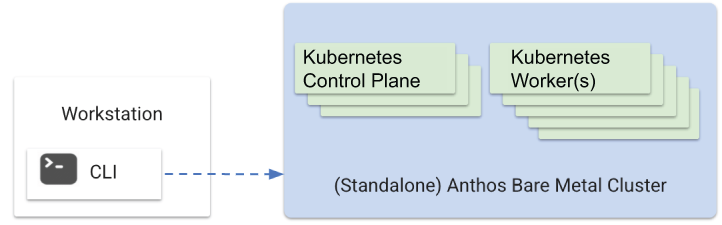
Use the standalone-cluster diagram to compare a topology where one cluster provides both administrative and user-cluster roles. section 17.2.1
