Google Cloud console is a graphical interface for viewing and managing Google Cloud resources. For Anthos, its dashboards bring clusters and application workloads across locations and infrastructure providers into one operational view. Access benefits from Google Cloud Identity and Access Management (IAM) and any security configured on individual clusters. section 2.0
For day-to-day cluster operations, the console provides several paths:
- Inspect Pods, Services, ConfigMaps, persistent volumes, nodes and workloads after clusters are registered and users are authenticated. View workloads across clusters or filter by cluster. section 5.1.3
- Select Connect on a GKE cluster to obtain a command for Google Cloud Shell. On-premises and other-cloud clusters use Connect gateway functionality for remote access. section 5.1.3
- Edit and apply Kubernetes YAML through the interface when triaging an incident or developing. These changes become Kubernetes API calls through the Connect Agent; prefer automated, scripted management for production. section 5.1.3
- Inspect node information, including Docker, kubelet and memory pressure, during fault analysis before actions such as cordoning and draining a node. section 5.1.3
Verify a service-mesh deployment
After installing Anthos Service Mesh on a GKE cluster and deploying the Online Boutique application into an injection-enabled namespace, use the console’s Anthos Service Mesh service list and topology view as evidence that the application is running in the mesh. Check installation and Pod health separately with kubectl; the graphical view does not replace those checks. section 4.7.1
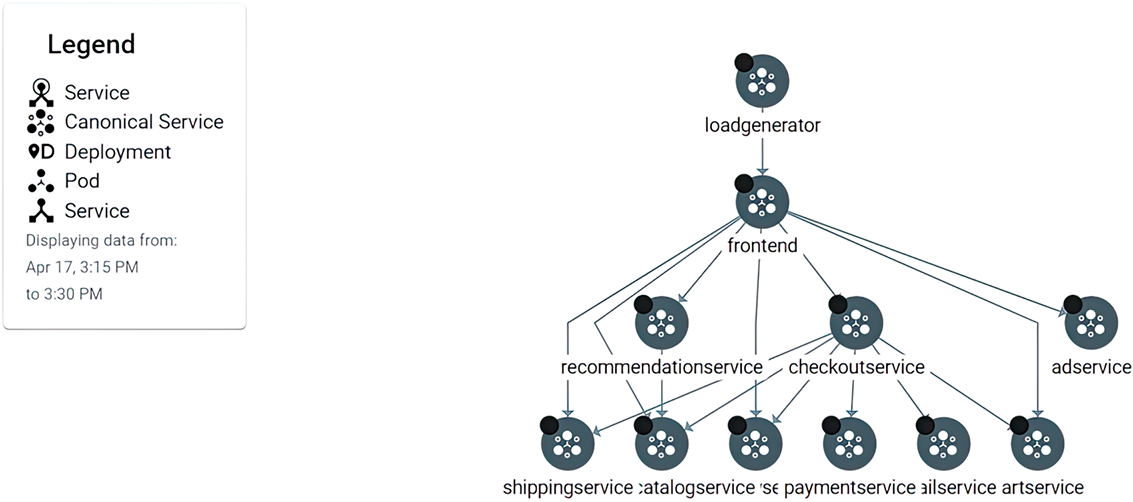
The topology view is the visual check used alongside the service list to inspect the deployed mesh application. section 4.7.1
Run a VM migration through the interface
Migrate to Containers can take a Compute Engine VM application toward GKE through the console: add a processing cluster, configure a migration source, start a migration, review or edit its plan, and generate artifacts. The processing cluster controls the migration; artifacts go to Google Cloud Storage and images to Google Container Registry. This console workflow supports Google Cloud clusters, not Anthos on AWS or VMware, even though processing clusters may run in the cloud or on-premises. section 15.4.3
