liveBook · Manning

Elements diagram

As explained in Functional Design and Architecture: Examples in Haskell

An elements diagram is an informal exploratory diagram in which software and domain elements are placed and related without a required central structure or formal notation.

An elements diagram is an informal brainstorming map for exploring how software and domain elements might fit together before forming an architecture. It has no required central object, formal notation, or complete structure: every element is equal, and some may remain unconnected. section 3.2.2

Start by placing possibilities without filtering them. Suitable elements include concepts, domain terms, libraries, layers, objects, and speculative notions. The diagram preserves exploration rather than prematurely committing to implementation. section 3.2.2

Useful relations include:

  • A is part of B; A contains B; A uses B; A implements B. section 3.2.2
  • A is B; A is related to B; A is made of B; A interacts with B. section 3.2.2

From possibilities to architecture

For logic control, expand the notion into candidate elements. For interoperability, relate the interoperability layer to the network, database, and GUI; relate scripts to a scripting language and data storage to a relational database. These sketches can later inform the architecture diagram. section 3.2.2 section 3.4

Figure 3.8 Simple elements diagram
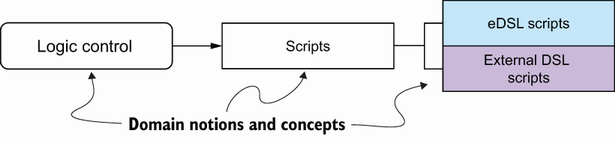
Use the simple elements diagram as a visual starting point for unconstrained exploration. section 3.2.2

How Functional Design and Architecture: Examples in Haskell covers it

How deep it goes
Defines an unconstrained visual method and relation types, but stops short of formal notation or the final architecture.
Examples
Uses logic control, interoperability, scripts, scripting languages, data storage, relational databases, networks, databases, and GUIs.
What it assumes
Assumes a preceding necessity diagram and teaches exploratory architecture reasoning before formal module organization.
What you can do after
Practice/perform exploratory design by placing candidate elements and connecting them without prematurely enforcing structure.
How it connects
Connects necessity diagrams, concept maps, mind maps, architecture diagrams, modules, subsystems, and relations.

Related concepts

This explainer was generated by Manning's knowledge graph from the text of Functional Design and Architecture: Examples in Haskell. The section links point to the parts of the book it draws on.